
ASUS RT-AC5300 port forwarding: step-by-step guide
This guide shows in 9 steps how to forward port 80 (HTTP) on the ASUS RT-AC5300 to your PC, so that a web server such as the free cFos Personal Net is reachable from the Internet. Other routers: all guides.
Enable port forwarding for the ASUS RT-AC5300

1 Log into your router with your username and password (default IP: 192.168.1.1 - default username/password: admin)
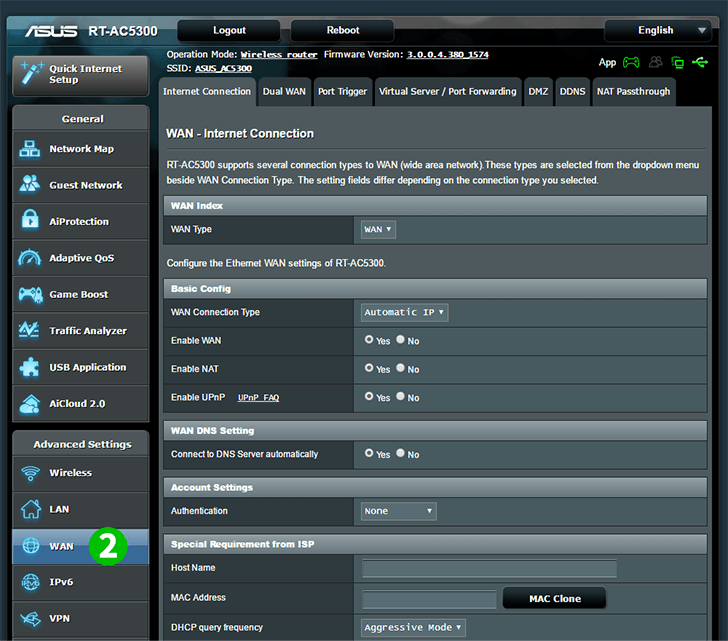
2 Click on "WAN" in the main menu on the left

3 Click on "Virtual Server / Port Forwarding" tab
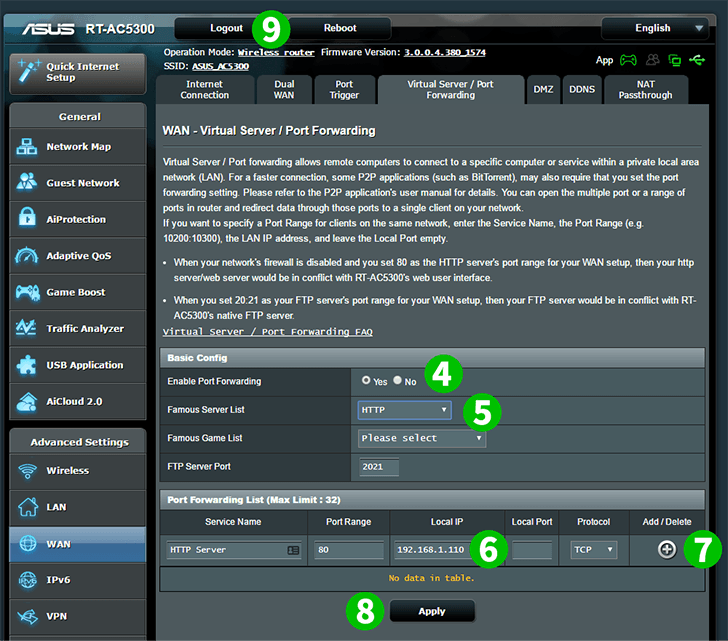
4 Click on "Yes"
5 Select "HTTP" from the drop-down
6 Enter the (preferably static) IP of the computer cFos Personal Net is running on in the "Local IP" field
7 Click the "Add" icon
8 Click "Apply"
9 Log out of your router by clicking on "Logout" at the top of the page
Port forwarding is now configured for your computer!