Traffic Shaping Options
For each connection, you can adjust the following settings:
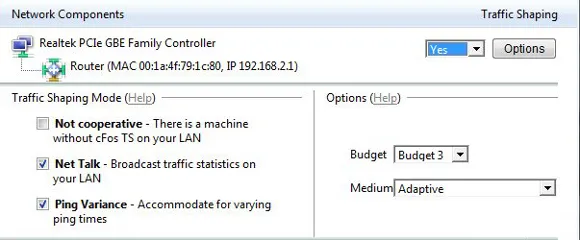
Traffic Shaping Mode (Multi-User version)
Not cooperative – There is a machine without cFos TS on your LAN You use your connection with several other machines simultaneously and at least one of them has no cFos Traffic Shaping. Net Talk – Broadcast traffic statistics on your LAN To improve accuracy, send Traffic Shaping statistics to other PCs on your local (home) network. No data is sent to the Internet. Ping Variance – Use advanced Traffic Shaping to accommodate for varying ping times Gather ping statistics to accommodate for variation in ping times; especially useful for mobile/wireless connections.Medium/Protocol
- Adaptive: cFos/cFosSpeed will adapt to your connection automatically. Use this setting only if you are not sure what your connection type is. Otherwise, select the setting that applies to your connection. The better the chosen setting fits your connection type, the lower ping times should be.
- DSL (PPPoE): Most widespread DSL protocol (commonly used in the USA, Germany, Eastern Europe, and other major markets). PPPoE explanation @ wikipedia.org
- DSL (PPPoA/Vcmux): Common standard in Great Britain. PPPoA explanation @ wikipedia.org
- DSL (PPPoA/LLC): Occasionally used in Great Britain PPPoA explanation @ wikipedia.org
- DSL (PPTP): Older DSL standard still in use in some parts of France. PPTP explanation @ wikipedia.org
- Cable: Internet via TV cable with bandwidth that may vary slightly according to usage and time of day. Cable technique @ wikipedia.org
- ISDN: 8 or 16 kbytes, bidirectional, PPP in HDLC frames ISDN explanation @ wikipedia.org
- IP over AAL5: IP data transfer via ATM ATM Adaptation Layer @ wikipedia.org
- RFC 1483/2684: DSL over ATM bridging
- Frame Count: Transfer speed varies with the number of data packets transmitted per time interval. Sometimes used in Greece.
- Mixed Raw IP/Frame Count: Downstream traffic is handled as in “Frame Count”, upstream traffic as in “Cable”. Used by some cable providers like ish.
How do I optimally calibrate cFos / cFosSpeed?
- Clear the traffic shaping data by clicking on “clear calibration data”
- Make a short full-speed download. (5-10 seconds)
- Make a longer full-speed upload (30 sec – 1 min). It is important that this upload is as fast as possible, i.e., that the server you’re sending to is near and powerful (like your mail server or some fast FTP server). moreover, it is important that you have no downloads running while you do this upload. with an upstream of 256 kbit/s you need to send some 2 mbyte to the other side.
- That’s it. The connection is well calibrated if you have a full-blast upload and still have low ping times (both can be watched in the status window).