
News
News and press releases of cFos Software GmbH, newest first. Every release is shown in full; older ones (2001 to 2010) follow at the end of the page.
For journalists
Logos, product boxes, screenshots and diagrams for articles and reviews: artwork for the press.
Our LICENSE allows the distribution of the latest cFos and cFosSpeed Shareware Versions on CDs released within a magazine.
Please read LICENSE_SP for detailed information concerning cFosSpeed and LICENSE for detailed information concerning cFos.
Press releases
· Press release
New version: cFosSpeed 11
Extensive re-write of the cFosSpeed core networking code (NDIS code):
- Special speed-up for pass-through LAN traffic (not traffic shaped)
- Designed to keep all out-of-band packet info intact, resulting in improved ad hoc VPN compatibility
- Improved analysis of networking edge cases
- Support for NDIS header/data split
- Additional speed improvements of Traffic Shaping path
- Support for Task Offloading: Checksum Offloading (IP and TCP/UDP), Large Segment Offloading and Receive Segment Coalescing
With the new networking code cFosSpeed has only barely noticeable CPU load even at full blast 10 GBit/s LAN traffic!
- Improved usability of the config dialogs and status window
- As usual: Lots of bugfixes and improvements. See the complete list at www.cfos.de/en/cfosspeed/whats-new.htm.
You can find artwork, screenshots and boxshots which may be used for free by journalists at www.cfos.de/en/news/artwork.htm
In addition our licensing terms allow the use the 30-day trial versions of our software in magazine's covermounts or the distribution on digital media, like CDs, DVDs, etc.
Supported operating systems: Windows 10, 8.1, 8, 7, Vista, XP and Server 2003/2008 (x86 and x64 editions)
Website (in English and German, with individual sections in up to 26 other languages): www.cfos.de
· Press release
New version: cFosSpeed 10.50 for Windows 10
New cFosSpeed maintenance release is out. This version has a lot of polish and internal improvements. In addition:
- The program priority list is now updated automatically.
- The "Current connections" dialog now displays the host name, instead of the IP address if possible.
- Improved usability of the status window. Improved support of multiple monitors.
- As usual: Lots of bugfixes and improvements. See the complete list at www.cfos.de/en/cfosspeed/whats-new.htm.
You can find artwork, screenshots and boxshots which may be used for free by journalists at www.cfos.de/en/news/artwork.htm
In addition our licensing terms allow the use the 30-day trial versions of our software in magazine's covermounts or the distribution on digital media, like CDs, DVDs, etc.
Supported operating systems: Windows 10, 8.1, 8, 7, Vista, XP and Server 2003/2008 (x86 and x64 editions)
Website (in English and German, with individual sections in up to 26 other languages): www.cfos.de
· Press release
New version: cFosSpeed 10.22 for Windows 10
New cFosSpeed maintenance release is out
▌Top feature is the new "perma-speedtest" in the Metro skin
A new button in the bottom right corner of the status window lets you switch between the current CPS rate and the last achieved receive and transmit speed. Thereby you can always check what line speed you currently have based on the last bandwidth usage.
▌As usual: Lots of bugfixes and improvements
See the complete list at www.cfos.de/en/cfosspeed/whats-new.htm
You can find artwork, screenshots and boxshots which may be used for free by journalists at www.cfos.de/en/news/artwork.htm
In addition our licensing terms allow the use the 30-day trial versions of our software in magazine's covermounts or the distribution on digital media, like CDs, DVDs, etc.
Supported operating systems: Windows 10, 8.1, 8, 7, Vista, XP and Server 2003/2008 (x86 and x64 editions)
Website (in English and German, with individual sections in up to 26 other languages): www.cfos.de
· Press release
cFos Personal Net v4.0 - Web server for the personal cloud
Version 4.0 now as portable version
cFos Personal Net is a Web server for Windows for easy hosting of files or multimedia content on your PC. Your data can then be easily accessed from within the LAN and from the Internet.
Important new feature of this version:
- cFos Personal Net can now be used in portable mode. This allows extremely simple hosting of files without software installation. Simply double-click on
cfospnet_portable.exe
and publish files with the Windows Explorer. These are available for download as long as cFos Personal Net runs. Links to the files are written to the clipboard so they can easily be shared with your partner via messenger or mail.
You can also copy an upload link to the clipboard, because cFos Personal Net allows uploading of files.
One possible use-case is to run cFos Personal Net from a memory stick, which you can take with you wherever you go. - This allows simplest hosting of files without the need to use 3rd party services or to make your files available to third parties.
- Learn more on our product page at
www.cfos.de/en/cfos-personal-net/cfos-personal-net.htm.
cFos Personal Net is available as a 30-day trial version, which can be downloaded for free at http://cfos.de/dl.
The full version of cFos Personal Net is available for € 19,90 or in a bundle with cFosSpeed for € 29,90.
Supported operating systems: Windows 10, 8.1, 8, 7, Vista, XP and Server 2003/2008 (x86 and x64 editions)
You can find artwork, screenshots and boxshots which may be used for free by journalists at www.cfos.de/en/news/artwork.htm.
In addition our licensing terms allow the use the 30-day trial versions of our software in magazine's covermounts or the distribution on digital media, like CDs, DVDs, etc.
Website (in English and German, with individual sections in up to 26 other languages):
· Press release
New version: cFosSpeed 10.10 for Windows 10
Top features of this version:
- cFosSpeed now runs with Windows 10
This version fixes some installation and upgrade issues. - Added Ping Statistics
cFosSpeed can now display a history of the ping times of the last 5 minutes. This feature is especially useful for gamers who want to diagnose the cause of lag. After a lag experience, you can now conveniently open the ping statistics graph and determine if the lag came from your end of the line or at a remote location, like the game server or some router in between. - Added support for UPnP capable routers
cFosSpeed can now determine the line speed and the maximum line speed by querying the gateway (router) to the Internet. It supports the functionionality of the UPnP Forum's Internet Gateway Device specification as well as the specification of the DSL Forum. So both types of UPnP routers can help to speed up the line calibration in cFosSpeed. We therefore recommend users turn on UPnP in their routers. - Lots of bugfixes and improved compatibility
See the complete list at whats-new.htm.
Supported operating systems: Windows 10, 8.1, 8, 7, Vista, XP and Server 2003/2008 (x86 and x64 editions)
You can find artwork, screenshots and boxshots which may be used for free by journalists at www.cfos.de/en/news/artwork.htm.
In addition our licensing terms allow the use the 30-day trial versions of our software in magazine's covermounts or the distribution on digital media, like CDs, DVDs, etc.
Website (in English and German, with individual sections in up to 26 other languages):
· Press release
New version: cFosSpeed 10 for Windows 10
Top features of this version:
- cFosSpeed now runs with Windows 10
- Added support for UPnP capable routers
cFosSpeed can now determine the line speed and the maximum line speed by querying the gateway (router) to the Internet. It supports the functionionality of the UPnP Forum's Internet Gateway Device specification as well as the specification of the DSL Forum. So both types of UPnP routers can help to speed up the line calibration in cFosSpeed. We therefore recommend users turn on UPnP in their routers. - Lots of bugfixes and improved compatibility
See the complete list at whats-new.htm.
Supported operating systems: Windows 10, 8.1, 8, 7, Vista, XP and Server 2003/2008 (x86 and x64 editions)
You can find artwork, screenshots and boxshots which may be used for free by journalists at www.cfos.de/en/news/artwork.htm.
In addition our licensing terms allow the use the 30-day trial versions of our software in magazine's covermounts or the distribution on digital media, like CDs, DVDs, etc.
Website (in English and German, with individual sections in up to 26 other languages):
· Press release
New version: cFosSpeed v9.6 now with IPv6 and Phone Skins
Top features of this version:
- cFosSpeed has now full IPv6 support. It can be used in a pure IPv6 or dual stack or pure IPv4 environment.
- Status and prioritization now as Web-App:
cFosSpeed can now display the status window as a web page on your phone or tablet in the local network. While your PC is in fullscreen mode, e.g., during gameplay, movies or running Metro Apps, you stay informed about current ping time and bandwidth usage.
See phone-skins.htm for more information.
In addition the connection prioritization dialogs are also available as webpages. So you can use your phone or tablet to monitor or prioritize the current connections of your PC. - Improved the Layer 7 protocol detection. cFosSpeed can now detect Google SPDY, HTTP Streaming with MPEG DASH, TLS 1.2 and SSL bulk connections. This is especially useful with streaming media, like Youtube videos.
- Bugfixes
See the complete list at whats-new.htm.
Supported operating systems: Windows 8, 7, Vista, XP and Server 2003/2008 (x86 and x64 editions)
You can find artwork, screenshots and boxshots which may be used for free by journalists at www.cfos.de/en/news/artwork.htm.
In addition our licensing terms allow the use the 30-day trial versions of our software in magazine's covermounts or the distribution on digital media, like CDs, DVDs, etc.
Website (in English and German, with individual sections in up to 26 other languages):
· Press release
New product: cFos Outlook DAV, v1.0 released
cFos Outlook DAV is an Add-in for Microsoft Outlook to synchronize Outlook Appointments with a CalDAV server.
The banter between Microsoft and Google about the synchronization of calendar appointments (ActiveSync) has given us the idea to develop our own solution for Windows desktop. It uses CalDAV as the open standard for calendar synchronisation.
cFos Outlook DAV is now available in the v1.0 pre-release, which can be used for free until the end of this year. From Jan 1st, 2014 users will be able to buy it for 9,90 Euro.
cFos Outlook DAV was tested successfully with the google calendar, DAViCal and cFos Personal Net, our own CalDAV webserver (*).
More Information and Download on our product page: www.cfos.de/en/cfos-outlook-dav/cfos-outlook-dav.htm .
Further development of cFos Outlook DAV is driven by user feedback. Users can make suggestions in our forum at http://www.cfos.de/forum .
From June 18th, 2013 until July 08th, 2013 there is also a sale with a discount of 30% for all our products, in addition the bundle of cFosSpeed and cFos Personal Net is available for 19,90 Euro.
(*) cFos Personal Net is not only a powerful webserver, but can also host your data in your Personal Cloud via WebDAV, CalDAV and CardDAV. Therefore it is optimally suited for cFos Outlook DAV.
You can find artwork, screenshots and boxshots which may be used for free by journalists at www.cfos.de/en/news/artwork.htm.
In addition our licensing terms allow the use the 30-day trial versions of our software in magazine's covermounts or the distribution on digital media, like CDs, DVDs, etc.
Website (in English and German, with individual sections in up to 26 other languages):
· Press release
New Product: cFos Personal Net v3.0 - Web server for the personal cloud
Version 3.0 now with UPnP AV media server
cFos Personal Net is a Web server for Windows for easy hosting of files or multimedia content on your PC. Your data can then be easily accessed from within the LAN and from the Internet.
Important new features of this version:
- UPnP AV media server
You can now share audio, video and pictures with other UPnP devices in your household, like tablets, TV sets, etc. - Re-organized dialogs to make home web hosting extremely easy. For example you can manage several users with cFos Personal Net and publish files for them with a click from the Windows Explorer context menu.
- On the professional side, we added PHP and Perl scripting support, so you can run packages for professional web hosting with cFos Personal Net. Since we moved our own web site, www.cfos.de, to cFos Personal Net we also took the opportunity to tweak the performance for heavy-use scenarios.
- Added support for the old HTTP 1.0 protocol (e.g. for wget) and also a ton of bug fixes and minor improvements.
cFos Personal Net is not only a powerful web server, but also allows hosting your Personal Cloud with built-in WebDAV, CalDAV and CardDAV.
cFos Personal Net is available as a 30-day trial version, which can be downloaded for free at http://cfos.de/dl.
The full version of cFos Personal Net is available for € 19,90 or in a bundle with cFosSpeed for € 29,90.
Supported operating systems: Windows 8, 7, Vista, XP and Server 2003/2008 (x86 and x64 editions)
You can find artwork, screenshots and boxshots which may be used for free by journalists at www.cfos.de/en/news/artwork.htm.
In addition our licensing terms allow the use the 30-day trial versions of our software in magazine's covermounts or the distribution on digital media, like CDs, DVDs, etc.
Website (in English and German, with individual sections in up to 26 other languages):
· Press release
New version: cFosSpeed v9.0 now with smarter prioritization!
Top features of this version:
- cFosSpeed now comes with a smarter connection analysis to detect light and heavy traffic, regardless of the detected L7 protocol.
This has several benefits:
- Many L7 protocols can be either light or heavy traffic, for example SSL or SSH. If it is only light traffic, the user typically has an interactive application (e.g. website login, etc.), while heavy traffic is typically used for uploads/downloads. cFosSpeed can now automatically prioritize light and heavy traffic regardless of the L7 protocol. You can also configure the priority for the detected L7 protocol (SSL, SSH, others and unknown protocols), depending on bulk (heavy) or light traffic.
- cFosSpeed's automatic detection of light traffic is especially useful for online games, which typically use unknown proprietary protocols. So game traffic can be automatically prioritized (to high).
- HTTP connections are now dynamically analyzed. cFosSpeed can detect when a HTTP connection is re-used and will then reprioritize it. For example a HTTP connection to a web page might first be used as interactive HTTP traffic (high priority) and later re-used for a long download (low priority).
- Revamped the dialogs in Windows 8 style. They are now easier to use and faster.
- Tons of bugfixes
Complete list at whats-new.htm.
Supported operating systems: Windows 8, 7, Vista, XP and Server 2003/2008 (x86 and x64 editions)
You can find artwork, screenshots and boxshots which may be used for free by journalists at www.cfos.de/en/news/artwork.htm.
In addition our licensing terms allow the use the 30-day trial versions of our software in magazine's covermounts or the distribution on digital media, like CDs, DVDs, etc.
Website (in English and German, with individual sections in up to 26 other languages):
· Press release
New Product: cFos Personal Net - Web server for the personal cloud
Version 2.0 is now ready for download!
cFos Personal Net is a Web server for Windows for easy hosting of files or multimedia content on your PC. Your data can then be easily accessed from within the LAN or from the Internet.
Important new features of this version:
- File synchronisation with WebDAV (RFC 4918).
Manage your own cloud storage from Windows and Smartphones. Also manage your public web space with Windows Explorer (no need for an extra FTP client). - Synchronisation of calendars and address books with CalDAV (RFC 4791) and CardDAV (RFC 6352).
- The personal calendar and the personal address book are created automatically on the first access. So in most cases there is no additional server site configuration required.
cFos Personal Net is now not only a powerful web server, but also optimally geared for the personal Cloud.
cFos Personal Net is available as a 30-day trial version, which can be downloaded for free at http://cfos.de/dl.
The full version of cFos Personal Net is available for € 19,90 or in a bundle with cFosSpeed for € 29,90.
Supported operating systems: Windows 8, 7, Vista, XP and Server 2003/2008 (x86 and x64 editions)
You can find artwork, screenshots and boxshots which may be used for free by journalists at www.cfos.de/en/news/artwork.htm.
In addition our licensing terms allow the use the 30-day trial versions of our software in magazine's covermounts or the distribution on digital media, like CDs, DVDs, etc.
Website (in English and German, with individual sections in up to 26 other languages):
· Press release
cFos WMI Monitor - Free add-on for cFos Personal Net
View vital WMI data on your PC or smartphone.
The cFos WMI Monitor is a free add-on for cFos Personal Net to display nearly all WMI values about your system, e.g. CPU load, GPU load, network usage, ping time, etc. Access these WMI values from anywhere.
The cFos WMI Monitor helps gamers, power users, musicians, etc. to monitor the performance of different components in the system while running their (full-screen) applications. The cFos WMI Monitor makes this information available in a browser window on your PC or smartphone.
It can display the following WMI values:
- Presets: Frequently needed values, like CPU load, CPU frequency, network performance, ping time, etc.
- Process Monitoring: CPU load of all running processes
- Arbitrary WMI values on your PC or other machines in the Windows network
The cFos WMI Monitor is free for all cFos Personal Net users. If you have a cFos Personal Net version prior to V1.3 installed, it will automatically be updated.
cFos Personal Net is a Web server for Windows for easy hosting of files or multimedia content on your PC. Your data can then be easily accessed from within the LAN or from the Internet.
See a video of the cFos WMI Monitor in action.
cFos Personal Net is available as a 30-day trial version, which can be downloaded for free at http://cfos.de/dl.
Special prices until October 9th:
With the release of cFos WMI Monitor we start a sale for cFos Personal Net until October 9th, 2012. cFos Personal Net, Life-Time License (all future updates free) costs 12,90 Euro (afterwards 19,90 Euro). Also due to popular demand the cFosSpeed + cFos Personal Net bundle is back. Lifetime-license for both products costs 19,90 Euro (afterwards 29,90 Euro).
Supported operating systems: Windows 8, 7, Vista, XP and Server 2003/2008 (x86 and x64 editions)
You can find artwork, screenshots and boxshots which may be used for free by journalists at www.cfos.de/en/news/artwork.htm.
In addition our licensing terms allow the use the 30-day trial versions of our software in magazine's covermounts or the distribution on digital media, like CDs, DVDs, etc.
Website (in English and German, with individual sections in up to 26 other languages):
· Press release
New Product: cFos Personal Net - Web server for the personal cloud
Version 1.0 is now ready for download .
cFos Personal Net is a Web server for Windows for easy hosting of files or multimedia content on your PC. Your data can then be easily accessed from within the LAN or from the Internet.
Last Minute updates for the release:
- Sidebar Gadget to display the current transfers. So you always see what's going on on your server.
- WebDAV (RFC4918) to easily manage files on the server with Windows Explorer and for synchronisation of your shared files for your personal cloud.
Major features:
- Easy installation and instant web hosting of your data within a few minutes.
- Seamless Javascript integration. Use one language for server and browser.
- Functionality of a professional web server, including SSL, HTTP authentication, extremely low response times and good multi-core scalability.
Here is a video how to publish files with cFos Personal Net with only one click:
http://www.youtube.com/watch?v=fdZ1O_0E2Xk
cFos Personal Net is available as a 30-day trial version, which can be downloaded for free at http://cfos.de/dl.
The full version of cFos Personal Net is available for € 19,90 or in a bundle with cFosSpeed for € 29,90.
Supported operating systems: Windows 8, 7, Vista, XP and Server 2003/2008 (x86 and x64 editions)
You can find artwork, screenshots and boxshots which may be used for free by journalists at www.cfos.de/en/news/artwork.htm.
In addition our licensing terms allow the use the 30-day trial versions of our software in magazine's covermounts or the distribution on digital media, like CDs, DVDs, etc.
Website (in English and German, with individual sections in up to 26 other languages):
· Press release
New Product: cFos Personal Net - Web server for the personal cloud
Release date for version 1.0 is now confirmed: August 7th, 2012.
cFos Personal Net is a Web server for Windows for easy hosting of files or multimedia content on your PC. Your data can then be easily accessed from within the LAN or from the Internet.
Major features:
- Easy installation and instant web hosting of your data within a few minutes.
- Build your personal cloud and manage shared data with your PC and smartphone or tablet. All you need is a web browser on your clients.
- Seamless Javascript integration. Use one language for server and browser.
- Functionality of a professional web server, including SSL, HTTP authentication, extremely low response times and good multi-core scalability.
Here is a video how to publish files with cFos Personal Net with only one click:
http://www.youtube.com/watch?v=fdZ1O_0E2Xk
The current release candidate v0.92 can be downloaded at http://cfos.de/dl .
Special prices until release day at August 7th:
cFos Personal Net, Life-Time License (all future updates free) for 9,90 Euro. Afterwards 19,90 Euro.
cFosSpeed + cFos Personal Net, Life-Time License for 19,90 Euro, afterwards 29,90 Euro.
cFosSpeed and cFos Personal Net are an ideal combination, since cFosSpeed as a Traffic Shaping and prioritization tool keeps the Internet connection responsive and fast, even if cFos Personal Net temporarily needs the whole bandwidth.
Supported operating systems: Windows 8, 7, Vista, XP and Server 2003/2008 (x86 and x64 editions)
You can find artwork, screenshots and boxshots which may be used for free by journalists at www.cfos.de/en/news/artwork.htm.
In addition our licensing terms allow the use the 30-day trial versions of our software in magazine's covermounts or the distribution on digital media, like CDs, DVDs, etc.
Website (in English and German, with individual sections in up to 26 other languages):
· Press release
New version: cFosSpeed v8.0 accelerates downloads!
The new TCP RWIN expansion helps Windows TCP Auto-Tuning and also accelerates downloads with a lot of programs.
- New major feature: RWIN Expansion
A lot of users don't get the maximum speed available for their Internet connection. In many cases the TCP Auto-Tuning of Windows 7/ Windows Vista cannot use the full download speed. In other cases the downloading programs are not written for today's high speed connections. cFosSpeed now accelerates these downloads by dynamically expanding the receive window size of the TCP connection to a value suitable for the current connection. This leads to (even for us) unexpected speed improvements! For example, we could double the download speed with Internet Explorer and nearly triple the speed of mobile UMTS downloads.
This is the most dramatic speed improvement any tuning software has achieved in years. Therefore we (with the help of our users) have compiled a list of scenarios in which the new cFosSpeed RWIN Expansion achieves these huge speed improvements. See here the list of impressive results:
http://www.cfos.de/en/cfosspeed/rwin-expansion.htm
Technical background: TCP Auto-Tuning measures the RTT of connections at the beginning and if data is sent. For connections with only received data and no data to send this measurement can become inaccurate, so the resulting RWIN remains too small. You can easily verify this behaviour with a fast Internet connection and high latency, for example a 50Mbit/s connection from Europe to America or a mobile broadband connection. - cFosSpeed v8 is "Ready for Windows 8"
Tested with Windows 8 Consumer Preview, x86 and x64. - As always: Lots of minor improvements and bugfixes
See whats-new.htm for details.
Supported operating systems: Windows 8, 7, Vista, XP and Server 2003/2008 (x86 and x64 editions)
You can find artwork, screenshots and boxshots which may be used for free by journalists at www.cfos.de/en/news/artwork.htm.
In addition our licensing terms allow the use the 30-day trial versions of our software in magazine's covermounts or the distribution on digital media, like CDs, DVDs, etc.
Website (in English and German, with individual sections in up to 26 other languages):
· Press release
New Product: cFos Personal Net - Web server for the personal cloud
cFos Personal Net is a Web server for Windows for easy hosting of files or multimedia content on your PC. Your data can then be easily accessed from within the LAN or from the Internet.
Major features:
- Easy installation and instant web hosting of your data within a few minutes.
- Build your personal cloud and manage shared data with your PC and smartphones or tablet. All you need is a web browser on your clients.
- Seamless Javascript integration. Use one language for server and browser.
- Functionality of a professional web server, including SSL, HTTP authentication, extremely low response times and good multi-core scalability.
After installation of cFos Personal Net you can access the public folder from a browser (e.g. type 'localhost' on the machine you installed cFos Personal Net on). All administrative functions are done via web browser. For example you can create a new user and allow this user to upload/download files. In addition, cFos Personal Net extends the Windows Explorer context menu, so you can publish files with a single click. These files can then be accessed with all devices running a web browser, like smartphones or tablets. By configuring your router and obtaining a dynamic IP address you can access these files even from remote Internet locations.
Sample uses:
- Publish your photos, movies or music for your friends.
- Share often needed documents between devices in your WLAN.
- Create server scripts for user feedback or online shops.
Our cFos Speed Test page at www.cfosspeed.de was hosted with cFos Personal Net and ran extremely reliably.
cFos Personal Net is available as 30-day trial version, which can be downloaded for free at www.cfos.de/download. Until the release of version 1.0, the full version cFos Personal Net v0.9 is available with a discount of 50% for 9,90 €.
Supported operating systems: Windows 7, Vista, XP and Server 2003/2008 (x86 and x64 editions)
You can find artwork, screenshots and boxshots which may be used for free by journalists at www.cfos.de/en/news/artwork.htm.
In addition our licensing terms allow the use the 30-day trial versions of our software in magazine's covermounts or the distribution on digital media, like CDs, DVDs, etc.
Website (in English and German, with individual sections in up to 26 other languages):
· Press release
New version: cFosSpeed v7.0 with next generation RX Shaping!
Download at: http://www.cfos.de
The new RX Shaping not only avoids network congestion, but actively controls the speed of your downloads according to the cFosSpeed prioritization scheme. To achieve that, cFosSpeed now has
- New major feature: Class Delay Management
cFosSpeed's RX Shaping reduces latency and avoids network congestion by controlling the TCP window size. With today's high-speed connections or with many simultaneous connections it may not be fine-grained enough to simply adjust the window size.
cFosSpeed's new technology, named "Class Delay Management", delays outgoing TCP ACKs if fine grained RX speed adjustment is necessary. This reduces the overall ping time during downloads and prevents network congestion if there are many downloads at the same time. In addition cFosSpeed will now more actively slow down other connections if high priority streams like video or audio are detected. - On-the-Fly Prioritization
You can now change the priority of any of your connections just by clicking at it. If one connection consumes too much bandwidth, you can temporarily reduce its priority. Just click on the connection to open the new On-the-Fly prioritization dialog. - Lots of minor improvements, like Bittorrent uTP detection, faster and simplified dialogs and status window and lots of bug fixes.
See also our new video which demonstrates the new cFosSpeed features:
http://www.youtube.com/watch?v=kM9Etd7xlOc
You can find artwork, screenshots and boxshots which may be used for free by journalists at
www.cfos.de/en/news/artwork.htm
Supported operating systems: Windows 7, Vista, XP and Server 2003/2008 (x86 and x64 editions)
Website (in English and German, with individual sections in up to 26 other languages):
· Press release
New version: cFosSpeed v6.6 with improved prioritization!
Download at:
cFosSpeed - The Internet Accelerator!
cFosSpeed is a network driver which attaches itself to existing Internet connections. It optimizes data transfer by means of Traffic Shaping. Traffic Shaping is a method for optimizing Internet traffic that allows maximum transfer speed while ensuring minimal ping time.
cFosSpeed supports a wide variety of connection types like DSL, cable, UMTS, ISDN, etc.
This is a maintenance release. Here are the most important changes:
- Improved prioritization
cFosSpeed enforces the prioritization rules more strictly. By prioritizing TCP SYNs the connection setup is significantly accelerated. Improvements of the transmission of data in the respective priority classes now allows to use your Internet connection up to its full capacity during simultaneous upload and download.
Also: User-defined program prioritizations have now a stronger effect. In conjunction with the reduced latency since cFosSpeed version 6.5 a fully utilized Internet connection now feels virtually like an idle connection. - Better support for satellite connections, i.e., connections with more than 1 second ping time.
- Gaming Features
Because the cFosSpeed status window is not visible in full-screen mode, the most important information can now be indicated by the LEDs of normal keyboards. In addition cFosSpeed now supports the Logitech Gamer Keyboards G19 and G15 (and thereby also G510 and Gamepad G13). For this, cFosSpeed is now shipped with a skin for the color display as well as a skin for the monochrome display, which both support all the Gamer Keyboard features - cFosSpeed users frag their enemies faster! - Lots of other improvements and bugfixes.
You can find artwork, screenshots and boxshots which may be used for free by journalists at
www.cfos.de/en/news/artwork.htm
Supported operating systems: Windows 7, Vista, XP and Server 2003/2008 (x86 and x64 editions)
Website (in English and German, with individual sections in up to 26 other languages):
· Press release
New version: cFosSpeed v6.5 with major Traffic Shaping update!
cFosSpeed - The Internet Accelerator!
cFosSpeed is a network driver which attaches itself to existing Internet connections. It optimizes data transfer by means of Traffic Shaping. Traffic Shaping is a method for optimizing Internet traffic that allows maximum transfer speed while ensuring minimal ping time.
cFosSpeed supports a wide variety of connection types like DSL, cable, UMTS, ISDN, etc.
- New feature: Packet-Loss Avoidance
Today's high download speeds often result in buffer overflows in the broadband POPs. This leads to packet loss and reduces the transfer speed and increases the ping time (because of TCP retransmits). Now cFosSpeed detects such buffer overflows early and prevents packet loss by continually adjusting the download speed.
Packet-Loss Avoidance also aids the download Traffic Shaping. cFosSpeed's unique RX-Shaping feature can now reduce ping times to previously unseen values. Without RX-Shaping fast downloads unmistakably tie up your Internet connection. With cFosSpeed they are now hardly noticeable.
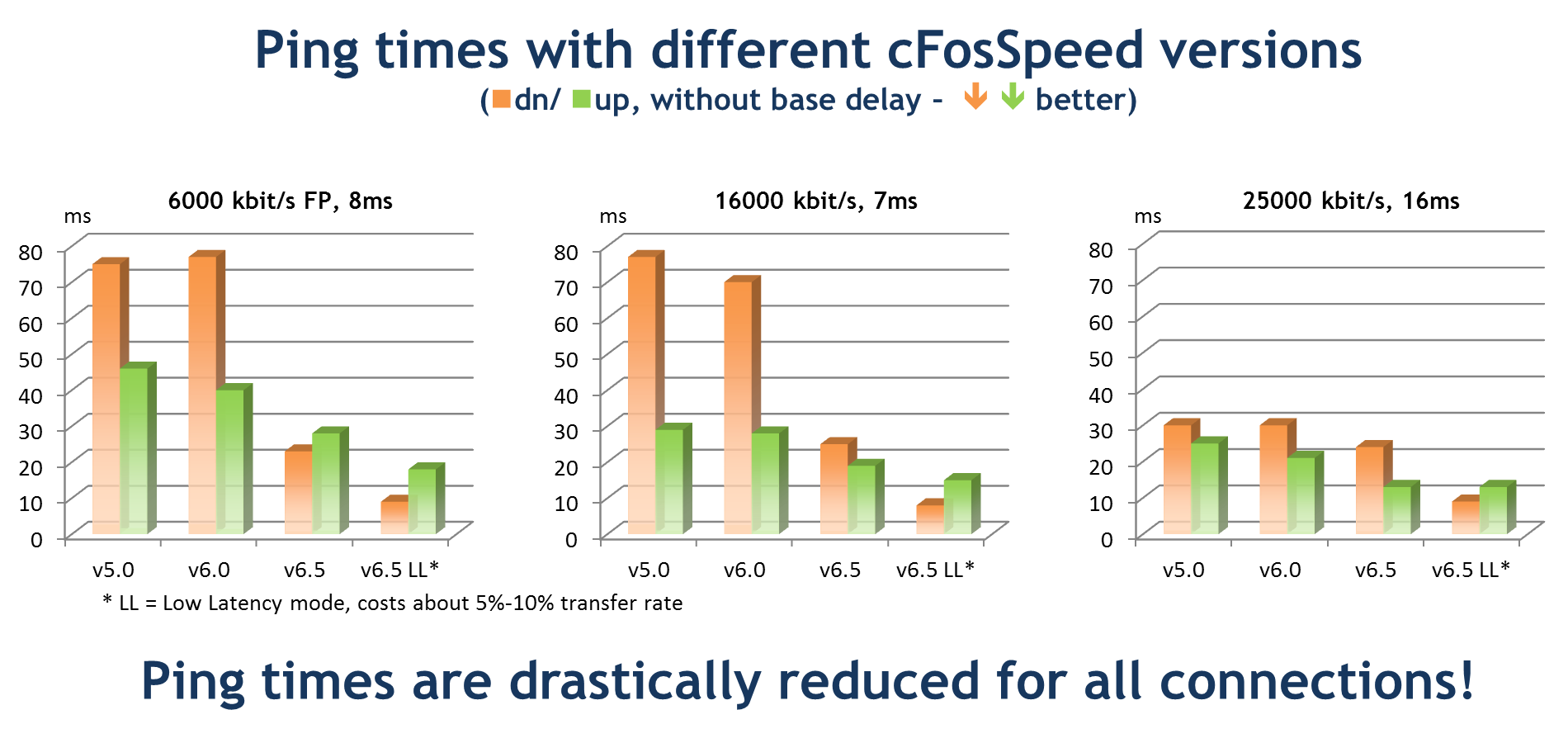
- Decisive Traffic Shaping improvements
All Traffic Shaping regulation parameters for the sending and receiving direction have been re-adjusted and optimized. This results in even lower ping times while allowing maximum upload and/or download speeds, see graphics below.
cFosSpeed's regulation quality is also important for ping variance / jitter. This improves the MOS value for VoIP connections.
cFosSpeed now allows you to manually setup the delay regulation parameters. Depending on the application the user can configure the desired maximum ping times for upload and download. This means that the user can manually reduce ping times at the expense of upload or download speed. - Extremely low ping times in "low-latency" mode
Hardcore gamers and VoIP users can now benefit from low-latency mode with even lower delays. In this mode cFosSpeed favors ping times even if this results in slightly decreased transfer rate. - Tons of other improvements and bugfixes.
You can find artwork, screenshots and boxshots which may be used for free by journalists at
www.cfos.de/en/news/artwork.htm
Supported operating systems: Windows 7, Vista, XP and Server 2003/2008 (x86 and x64 editions)
Website (in English and German, with individual sections in up to 26 other languages):
Older press releases (2001 to 2010)
- : New versions: cFosSpeed v6.0 with major features!
- : New versions: cFosSpeed v5.10 and cFos Professional v8.00
- : New cfos IPv6 Link v2.50 with major features!
- : cFosSpeed, new Version 5.00, now with real-time Traffic Analysis & new Pinger!
- : cFosSpeed, new Version 4.50 now with prioritisation for web-surfing.
- : cFos IPv6 Link, Connectivity with the new IPv6.
- : cFos Broadband Connect, new PPPoE dial-up driver for high-speed Internet.
- : cFosSpeed v4.0, Traffic Shaping with Multi-User Mode!
- : cFosSpeed v3.10, important update for Bittorrent users!
- : cFos v7.0 64-bit ISDN and DSL Driver uncovered!
- : cFosSpeed v3.0 major update with tons of new features and functions!
- : cFosSpeed v2.10, new improved quality for Voice-over-IP (VoIP)
- : cFos v6.0 now with new Traffic Shaping technology!
- : cFosSpeed v2.0 now with next-generation Traffic Shaping technology!
- : cFos introduces new product:
- : cFos Version 5.20 featuring advanced Internet tuning / Dynamic Traffic Shaping technology is out!
- : Neue cFos Version 5.0 mit Surfbeschleunigung / Internet Tuning
- : Pressemeldung vom 15.10.2002
- : Pressemeldung vom 22.12.2001
- : Pressemeldung vom 23.8.2001
- : Pressemeldung vom 16.1.2001
· Press release
New versions: cFosSpeed v6.0 with major features!
cFosSpeed is a network driver which attaches itself to existing Internet connections. It optimises data transfer by means of Traffic Shaping. Traffic Shaping is a method for optimizing Internet traffic that allows maximum transfer speed while ensuring minimal ping time.
cFosSpeed supports a wide variety of connection types like DSL, cable, UMTS, ISDN, etc.
The most important features about this version are:
-
Decisive Traffic Shaping improvements:
cFosSpeed Traffic Shaping now also optimizes mobile connections. UMTS, WCDMA, CDMA 2000, etc. have highly varying ping times. Under normal conditions this can lead to high latency and/or low throughput rates. Therefore cFosSpeed determines the "normal" ping time and its statistical deviation. These additional statistics are used for the speed regulation in Traffic Shaping, so that the transfer rate will remain high, even if ping times are higher for a short time. This gets the maximum out of mobile connections.
For fixed-line connections, like DSL and cable, cFosSpeed uses these statistics for sharper limits of the allowed ping time and can therefore reduce the latency by ca. 20 msec. The effect particularly shows with today's fast Internet connections, for example with games, VoIP and today's Web 2.0 pages with their frequent and small HTTP packets (interactive traffic).
By improving the ping engine cFosSpeed can now be used with connections which already employ other prioritization techniques, such as ACK- and ping-prioritizing routers. The benefit is a drastically reduced latency, as well as cFosSpeed's unique RX-shaping and protocol-prioritization. Without these functions a single data stream can congest the connection and impair the quality of other applications.
The TCP window auto-tuning used in Windows Vista and Windows 7 accelerates the regulation of RX-shaping, because the initial TCP windows size has far lower (more realistic) values and therefore does not need to be corrected so heavily. A luxury only available when you already have nice, low latency.
-
The new status windows now illustrate how cFosSpeed Traffic Shaping works. The "ping variance" display informs you about the current ping time variation and the reliability of the statistical data. These statistics will be re-evaluated every few minutes, as for mobile connection these values can change quickly during movement (travelling) or by changing utilization of radio cells.
The "Traffic Shaping Indicator" notifies you whenever cFosSpeed re-orders packets (which is one of the most important actions of Traffic Shaping). "Small blip - big change". The ping time is another indicator by which you can verify that the reaction time is nice and low even when your connection is heavily used.
In addition the configurable real-time analysis shows which protocols and programs currently use which amount of bandwidth.
-
Further Traffic Shaping optimizations:
Net Talk is a new feature, which allows you to use Traffic Shaping with several PCs in a LAN. With Net Talk all PCs inform each other about their respective send and receive statistics and use this information to control Traffic Shaping far more precisely. With simultaneous use of the ping variance statistics, it can help to detect rising ping times quickly and then counter it.
Based on the shared statistics Traffic Shaping works more accurately, since every member of the LAN knows about the traffic of all others.
The priority queues have been optimized (reduced) with regard to Compound TCP, now used in Windows Vista and Windows 7. Compound TCP is designed to detect early congestion and then reduce the send speed. Now cFosSpeed and Compound TCP work hand in hand: Compound TCP ensures a fast maximum sending speed while cFosSpeed meanwhile keeps the latency low.
-
New NDIS 6 driver:
cFosSpeed now contains a NDIS 6 driver for Vista. It automatically switches to NDIS 6.20 for Windows 7 and supports all the "speed-features" available in Microsoft's new network architecture, like dispatch-level tracking, data copy avoidance, early packet classification, etc. These features reduce the CPU load caused by network activity.
The new NDIS 6.20 driver also supports the Windows 7 Mobile Broadband Platform, the new driver architecture for mobile connection sticks.
- WLAN: Our tests have shown that with only moderate signal strength not only the transfer rate can degrade by 10% or more, but also the ping time begins to vary more than 50 msec, depending on WLAN utilisation. In this case cFosSpeed's new ping variance detection also helps to keep transfer speeds and pings in comfortable ranges.
- The new "Adapter Info" dialog makes all important parameters of the network adapters visible, especially for WLAN and WWAN (Mobile Broadband). For WLAN cFosSpeed also produces a channel recommendation. cFosSpeed calculates it by the number and signal strength of other WLAN access points in the vicinity and then selects the channel with the currently lowest frequency utilisation. You can use this as a hint to switch your WLAN access point to this channel, minimizing the risk of packet collisions.
- New dialogs for the configurable TX limits for individual programs and protocols.
- The new DivX webplayer as well as Teredo for IPv6 tunneling (for example used by Bittorrent) are now detected by cFosSpeed's layer-7 analysis and prioritized accordingly.
- Support for the Microsoft's security functions Data Execution Prevention (DEP) and Address space layout randomization (ASLR) for protections against attacks.
- Tons of other improvements and bugfixes, for details see WHATSNEW.TXT or https://www.cfos.de/cfosspeed/whats-new.htm
You can find artwork, screenshots and boxshots which may be used for free by journalists here
cFosSpeed is available either as a 30-day trial version (which can be downloaded for free at https://www.cfos.de/download/download.htm ) or as the full version for €14,90.
Supported Operating Systems:
Windows 7, Vista, XP and Server 2003/2008; x86 and x64 editions.
Web site (in English and German, with individual sections in up to 26 other languages): https://www.cfos.de
Boilerplate:
cFos Software GmbH, Bonn (Germany) is developing and fine-tuning communication drivers for different operating systems since 1993. Products include 'cFosSpeed', an advanced Traffic Shaping driver for broadband Internet and the IPv6 dial-up driver / software router 'cfos IPv6 Link' as well as 'cFos' and 'cFos Broadband Connect', high-performance DSL and ISDN dial-up drivers.
Legal Note:
Our licensing conditions do explicitly permit putting the most recently released shareware versions of cFos, cFos Broadband Connect, cfos IPv6 Link and cFosSpeed on free CDs for inclusion with magazines. For more on licensing issues, please consult our LICENSE.TXT file (at http://www.cfos.de/cfosspeed/license.htm). Both text and artwork on our Web site may be used for press and review purposes.
Contact:
Martin Winkler, email via contact form Tel. +49-228-7669826.
· Press release
New versions: cFosSpeed v5.10 and cFos Professional v8.00
cFosSpeed is a network driver which attaches itself to existing Internet connections. It optimises data transfer by means of Traffic Shaping. Traffic Shaping is a method for optimising Internet traffic that allows maximum transfer speed while ensuring minimal ping time.
cFosSpeed supports a wide variety of connection types like DSL, cable, UMTS, ISDN, etc.
cFos is an ISDN & DSL Dial-Up network driver with lots of additional functions.
The most important improvements of these maintenance versions are:
- Improved Streaming detection, e.g. with NSPlayer, Flash Videos, RTMP.
- Important Improvements for the dialogs and the installer.
- Icon (taskbar) version of the Real-time Traffic Analysis skin.
cFos Professional also has all the Traffic Shaping improvements of the last two years, like:
- Improved Pinger engine and improved Layer-7 analysis
- Real-time Traffic Analysis skin
- IP blocking lists
You can find artwork, screenshots and boxshots which may be used for free by journalists here .
cFosSpeed and cFos Professional are available either as a 30-day trial version (which can be downloaded for free at https://www.cfos.de/download/download.htm ) or as the full version for €14,90.
Supported Operating Systems:
Windows 7, Vista, XP and Server 2003/2008, Win2k; x86 and x64 editions.
Web site
in English and German, with individual sections in up to 26 other languages)::
Boilerplate:
cFos Software GmbH, Bonn (Germany) is developing and fine-tuning communication drivers for different operating systems since 1993. Products include 'cFosSpeed', an advanced Traffic Shaping driver for broadband Internet and the IPv6 dial-up driver / software router 'cfos IPv6 Link' as well as 'cFos' and 'cFos Broadband Connect', high-performance DSL and ISDN dial-up drivers.
Legal Note:
Our licensing conditions do explicitly permit putting the most recently released shareware versions of cFos, cFos Broadband Connect, cfos IPv6 Link and cFosSpeed on free CDs for inclusion with magazines. For more on licensing issues, please consult our LICENSE.TXT file (at http://www.cfos.de/cfosspeed/license.htm ). Both text and artwork on our Web site may be used for press and review purposes.
Contact:
Contact: Martin Winkler, e-mail via contact form Tel. +49-228-7669826.
· Press release
New cfos IPv6 Link v2.50 with major features!
Connectivity with the new IPv6 network.
cfos IPv6 Link allows dial-up with IPv6 for Windows XP and Vista. Simply configure the dial-up connection to your ISP and you're IPv6-ready! Not only does cfos IPv6 Link connect to the new IPv6 network, but it also configures routing and IP and DNS addresses automatically.
Major features of the new version are:
- NAT46 mapping. This allows IPv4-only software to be used with IPv6. To accomplish this, cfos IPv6 Link maps the IPv4 addresses to IPv6 addresses (and vice-versa). cfos IPv6 Link supports NAT46 for outgoing as well as incoming connections. This allows easy migration from IPv4 to IPv6.
- cfos IPv6 Link now supports multiple address prefixes, e.g. by Router Advertisement or DHCPv6 (prefix delegation), as well as statically assigned prefixes. Also cfos IPv6 Link now supports policy table updates according to RFC 3484 by means of DHCPv6 option OPTION_DASP.
- cfos IPv6 Link now supports DHCPv6 custom options. Third party applications, like ISPs dial-up software, can now query cfos IPv6 Link for DHCPv6 options (stateful and stateless) and use them to configure the system.
You can find artwork, screenshots and boxshots which may be used for free by journalists here .
cfos IPv6 Link is available either as a 30-day trial version (which can be downloaded for free at https://www.cfos.de/download/download.htm ) or as the full version for €29,90.
Supported Operating Systems:
Windows 7, Vista, XP and Server 2003/2008; x86 and x64 editions.
Web site
in English and German, with individual sections in up to 26 other languages)::
Boilerplate:
cFos Software GmbH, Bonn (Germany) is developing and fine-tuning communication drivers for different operating systems since 1993. Products include 'cFosSpeed', an advanced Traffic Shaping driver for broadband Internet and the IPv6 dial-up driver / software router 'cfos IPv6 Link' as well as 'cFos' and 'cFos Broadband Connect', high-performance DSL and ISDN dial-up drivers.
Legal Note:
Our licensing conditions do explicitly permit putting the most recently released shareware versions of cFos, cFos Broadband Connect, cfos IPv6 Link and cFosSpeed on free CDs for inclusion with magazines. For more on licensing issues, please consult our LICENSE.TXT file (at http://www.cfos.de/cfosspeed/license.htm ). Both text and artwork on our Web site may be used for press and review purposes.
Contact:
Contact: Martin Winkler, e-mail via contact form Tel. +49-228-7669826.
· Press release
cFosSpeed, new Version 5.00, now with real-time Traffic Analysis & new Pinger!
cFosSpeed is a network driver which attaches itself to existing Internet connections. It optimises data transfer by means of Traffic Shaping. Traffic Shaping is a method for optimising Internet traffic that allows maximum transfer speed while ensuring minimal ping time.
cFosSpeed supports a wide variety of connection types like DSL, cable, UMTS, ISDN, etc.
The most important improvements of this version are:
- Real-time Traffic Analysis: cFosSpeed can analyse traffic for different protocols and used programs and visualize these different traffic streams graphically in real-time. To do that there are two new status windows and a new dialog, by which the user can setup the assignment of different traffic streams to the respective graphs. This allows detailed analysis and thus comprehensive knowledge which traffic streams use how much bandwidth.
- New dynamic Ping Engine: for traffic shaping to function properly, cFosSpeed must know when the Internet connection begins to congest, i.e. when the ping time to the next hop begins to increase. This is now probed in a much more reliable and much more precise way. cFosSpeed can now simultaneously use up to 5 different ping variants, each for different hops respectively: ICMP, UDP and TCP in kernel-mode and ICMP, UDP in user-mode. Thereby the pings can pass common firewalls and filters in routers more reliably. cFosSpeed can even switch from one pinger to another dynamically during normal operations.
- cFosSpeed is Windows 7 compatible.
- Complete optical overhaul of the user interface; adapted to Vista / Windows 7.
- More improvements of the Layer-7 Protocol Analysis, especially the RTP (Voice over IP) and SSL / SSH (Bulk Mode) detection.
- IP filter-lists now support the Protowall / Peerguardian format.
- Lots of further improvements, see WHATSNEW.TXT.
You can find artwork, screenshots and boxshots which may be used for free by journalists here .
cFosSpeed is available either as a 30-day trial version (which can be downloaded for free at https://www.cfos.de/download/download.htm ) or as the full version for €14,90.
Supported Operating Systems:
Windows 7, Vista, XP and Server 2003/2008, Win2k; x86 and x64 editions.
Web site
in English and German, with individual sections in up to 26 other languages)::
Boilerplate:
cFos Software GmbH, Bonn (Germany) is developing and fine-tuning communication drivers for different operating systems since 1993. Products include 'cFosSpeed', an advanced Traffic Shaping driver for broadband Internet and the IPv6 dial-up driver / software router 'cFos IPv6 Link' as well as 'cFos' and 'cFos Broadband Connect', high-performance DSL and ISDN dial-up drivers
Legal Note:
Our licensing conditions do explicitly permit putting the most recently released shareware versions of cFos, cFos Broadband Connect, cFos IPv6 Link and cFosSpeed on free CDs for inclusion with magazines. For more on licensing issues, please consult our LICENSE.TXT file (at http://www.cfos.de/cfosspeed/license.htm ). Both text and artwork on our Web site may be used for press and review purposes.
Contact:
For more information on anything relating to cFos and cFosSpeed, please contact Martin Winkler, e-mail via contact form
· Press release
cFosSpeed, new Version 4.50 now with prioritisation for web-surfing.
cFosSpeed is a network driver which attaches itself to existing Internet connections. It optimises data transfer by means of Traffic Shaping. Traffic Shaping is a method for optimising Internet traffic. It allows maximum speed while ensuring minimal ping time.
cFosSpeed supports a wide variety of connection types, like DSL, cable, ISDN, UMTS, etc.
Important feature of this version is the differentiation between HTTP web-surfing and HTTP downloads. Thereby cFosSpeed can give web-surfing precedence and limit the bandwidth for HTTP downloads. Web-surfing is an interactive Internet use and needs a responsive connection while HTTP downloads can usually be limited, if the available bandwidth is required for more important tasks. With the dialog for protocol prioritisation the user can adjust the precedence of HTTP accordingly.
cFosSpeed is available either as a 30-day trial version (which can be downloaded for free at our download page ) or as the full version for €14,90 .
Supported Operating Systems:
Windows Vista, XP and Server 2003/2008, Win2k; x86 and x64 editions.
Web site
in English and German, with individual sections in up to 15 other languages)::
Boilerplate:
cFos Software GmbH, Bonn (Germany) is developing and fine-tuning communication drivers for different operating systems for the past 16 years. Products include 'cFos' and 'cFos Broadband Connect', high-performance DSL and ISDN dial-in drivers, as well as 'cFosSpeed', an advanced Traffic Shaping driver for broadband Internet connections and an IPv6 dial-up/router driver cFos IPv6 Link.
Legal Note:
Legal Note: Our licensing conditions do explicitly permit putting the most recently released shareware versions of cFos, cFos Broadband Connect, cFos IPv6 Link and cFosSpeed on free CDs for inclusion with magazines. For more on licensing issues, please consult our LICENSE.TXT file (at http://www.cfos.de/cfosspeed/license.htm ). Both text and artwork on our Web site may be used for press and review purposes.
Contact:
For more information on anything relating to cFos and cFosSpeed, please contact Martin Winkler, e-mail via contact form
· Press release
cFos IPv6 Link, Connectivity with the new IPv6.
cFos IPv6 Link allows Dial-Up with IPv6 for Windows XP and Vista. While Vista partly supports PPP Dial-Up into the IPv6, Windows XP has no PPP stack capable of IPv6 dial-up. In this case cFos IPv6 Link offers users of Windows XP to connect to the IPv6 network. Also under Windows Vista there are great advantages. For example it handles the automatic configuration of all connection parameters and is much faster than the driver shipped with Vista.
Everyone who wants to try cFos IPv6 Link, can use it with a DSL modem or an IPv4 router, which supports PPPoE-Passthrough.
cFos IPv6 Link supports the typical IPv6 address- and routing auto-configuration with
- IPv6 Neighbor Discovery (ND) + DAD
- IPv6 Router Advertisement
- IPv6 DHCP (DHCPv6) stateful & stateless
- IPv6 Router Solicitation with ISP
- DHCPv6 with ISP
In addition cFos IPv6 Link has a DNS mapper, which translates IPv4- and IPv6 DNS queries into queries for the IPv6 and into IPv4 if no IPv6 DNS server is known.
cFos IPv6 Link is available either as a 30-day trial version (which can be downloaded for free at our download page ) or as the full version for €29,- .
Supported Operating Systems:
Windows Vista, XP and Server 2003/2008, x86 and x64 editions.
Web site
in English and German, with individual sections in up to 15 other languages)::
Boilerplate:
cFos Software GmbH, Bonn (Germany) is developing and fine-tuning communication drivers for different operating systems for the past 15 years. Products include 'cFos' and 'cFos Broadband Connect', high-performance DSL and ISDN dial-in drivers, as well as 'cFosSpeed', an advanced Traffic Shaping driver for broadband Internet connections.
Legal Note:
Legal Note: Our licensing conditions do explicitly permit putting the most recently released shareware versions of cFos, cFos Broadband Connect, cFos IPv6 Link and cFosSpeed on free CDs for inclusion with magazines. For more on licensing issues, please consult our LICENSE.TXT file (at http://www.cfos.de/cfos-ipv6-link/license.htm ). Both text and artwork on our Web site may be used for press and review purposes.
Contact:
For more information on anything relating to cFos and cFosSpeed, please contact Martin Winkler, e-mail via contact form
· Press release
cFos Broadband Connect, new PPPoE dial-up driver for high-speed Internet.
cFos Broadband Connect is a network driver for very fast PPPoE Internet access, like DSL and Cable. While the driver shipped with Windows can only transfer up to 4.5 Mbyte/s (= 36 Mbit/s), cFos Broadband Connect sends up to 50 Mbyte/s (= 400 Mbit/s), tested with Gigabit LAN, Pentium 4 (3GHz).
cFos Broadband Connect is designed for maximum throughput under minimum CPU load. This leaves your CPU power to the actual Internet application, like media players, etc. At full speed cFos Broadband Connect needs only 3% CPU time.
cFos Broadband Connect supports all important PPPoE parameters. These can easily be configured with the phone number used for the Dial-Up connection. With Auto-Detect cFos Broadband Connect finds all Internet access points connected to your system.
cFos Broadband Connect can also accept incoming calls. This way, you can set up your own PPPoE server.
cFos Broadband Connect allows multiple PPPoE sessions simultaneously. You can use any number of incoming and outgoing sessions. With the 'Service-Name' and 'AC-Name' parameters you can restrict connections to certain services or access points.
cFos Broadband Connect supports NDIS 6 under Vista, thereby providing even more network performance.
cFos Broadband Connect is available either as a 30-day trial version (which can be downloaded for free at https://www.cfos.de/download/download.htm ) or as the full version, currently starting at a special offer price of €9,95.
Supported Operating Systems:
Windows Vista, XP and Server 2003, x86 and x64 editions.
Web site
in English and German, with individual sections in up to 15 other languages)::
Boilerplate:
cFos Software GmbH, Bonn (Germany) is developing and fine-tuning communication drivers for different operating systems for the past 15 years. Products include 'cFos' and 'cFos Broadband Connect', high-performance DSL and ISDN dial-in drivers, as well as 'cFosSpeed', an advanced Traffic Shaping driver for broadband Internet connections.
Legal Note:
Our licensing conditions do explicitly permit putting the most recently released shareware versions of cFos, cFos Broadband Connect and cFosSpeed on free CDs for inclusion with magazines. For more on licensing issues, please consult our LICENSE.TXT file (at http://www.cfos.de/broadband-connect/license.htm ). Both text and artwork on our Web site may be used for press and review purposes.
Contact:
For more information on anything relating to cFos and cFosSpeed, please contact Martin Winkler, e-mail via contact form
· Press release
cFosSpeed v4.0, Traffic Shaping with Multi-User Mode!
cFosSpeed is a network driver that optimises data transfer through Traffic Shaping. This technology allows cFosSpeed to minimise ping times while ensuring maximum data throughput and Voice-over-IP quality. For more information see http://www.cfos.de/traffic-shaping/traffic-shaping.htm
Highlights of the new version include:
- Multi-User Mode:
The new Traffic Shaping in cFosSpeed allows use of several PCs connected to one router. In this scenario the available bandwidth can change rapidly. cFosSpeed detects such changes and manages the data transfer so that ping times are good and no PC chokes another.
One Traffic Shaping variant provides good results even if there is a PC in the network with no cFosSpeed Traffic Shaping, e.g. Linux or Playstation.
In Multi-User mode there may be the need to restrict the throughput of an individual PC. Therefore cFosSpeed now offers fixed bandwidth limits. You can then, for example, reserve a minimum bandwidth for other PCs with interactive applications.
Our WHATSNEW.TXT provides a full list of changes.
cFosSpeed is available either as a 30-day trial version (which can be downloaded for free at our download page) or as the full cFosSpeed/Professional version, currently starting at a special offer price of €9,95.
Supported Operating Systems:
Windows 2000, Windows XP, Server 2003, Vista, in x86 and x64 editions.
Web site
in English and German, with individual sections in up to 15 other languages)::
Boilerplate:
cFos Software GmbH, Bonn (Germany) has been developing and fine-tuning communication drivers for different operating systems for the past 14 years. Products include cFos, a high-performance DSL and ISDN dial-in driver, and cFosSpeed, an advanced Traffic Shaping driver for broadband Internet connections.
Legal Note:
Our licensing conditions do explicitly permit putting the most recently released cFosSpeed shareware version on free CDs for inclusion with magazines. For more on licensing issues, please consult our LICENSE.TXT file (at https://www.cfos.de/cfosspeed/license.htm). Both text and artwork on our Web site may be used for press and review purposes.
Contact:
For more information on anything relating to cFos and cFosSpeed, please contact Martin Winkler, e-mail via contact form
· Press release
cFosSpeed v3.10, important update for Bittorrent users!
cFosSpeed is a network driver that optimizes data transfer through Traffic Shaping. This technology allows cFosSpeed to minimize ping times while ensuring maximum data throughput and Voice-over-IP quality. For more information see http://www.cfos.de/traffic-shaping/traffic-shaping.htm
Highlights of the new version include:
- Not only does cFosSpeed Traffic Shaping manage upstream data traffic, but it also controls downstream data reception. This new type of RX shaping is even better suited to support peer-to-peer applications with multiple connections running at the same time. As a result, even with as many as 500 connections already open, additional Internet applications can still be run with ease.
- The cFos online budgets to keep track of time spent online and volume used has now been integrated into cFosSpeed as well. This is particularly useful for those on broadband without a flat rate. In addition, data traffic is now presented in graphical format, making it possible to have different graphics displayed for budgets, programs, and protocols used.
- Tested for both 32-bit and 64-bit Vista Beta 2.
- A host of minor improvements including additional options for routing and IP configuration plus a new status-window control panel.
The WHATSNEW.TXT provides an itemized list of all changes.
cFosSpeed is available either as a 30-day trial version (which can be downloaded for free at our download page) or as the full cFosSpeed/Professional version, currently starting at a special offer price of €9.
Supported Operating Systems:
Windows 2000, Windows XP (Home & Professional), Windows Server 2003, as well as Windows XP x64 and Windows Server 2003 x64 editions.
Web site
(in English and German, with individual sections in up to 15 other languages):
Boilerplate:
cFos Software GmbH, Bonn (Germany) has been developing and fine-tuning communication drivers for different operating systems for the past 13 years. Products include cFos, a high-performance DSL and ISDN dial-in driver, and cFosSpeed, an advanced Traffic Shaping driver for broadband Internet connections.
Legal Note:
Our licensing conditions do explicitly permit putting the most recently released cFosSpeed shareware version on free CDs for inclusion with magazines. For more on licensing issues, please consult our LICENSE.TXT file (at https://www.cfos.de/cfos-professional/license.txt). Both text and artwork on our Web site may be used for press and review purposes.
Contact:
For more information on anything relating to cFos and cFosSpeed, please contact Martin Winkler, e-mail via contact form
· Press release
cFos v7.0 64-bit ISDN and DSL Driver uncovered!
Following up on its initial finds of 16-bit CAPI FOSSILS in early DOS deposits and later discoveries of 32-bit specimens in Windolithic layers, a team of cFos-O-logists led by Chris Lueders and Martin Winkler have now unearthed a 64-bit version of this once widespread genus of ISDN and DSL drivers in the skeletal remains of a recently excavated x64 Windosaurus. This proves that the cFos family belonged to only a select few driver species that succeeded in doubling bitwidth twice during their evolution
Hailed as a sensational find, this also calls into question long-established theories that posit such software had been under threat of extinction with the imminent rise of broadband networks. Windologists cite an amazing adaptability to new developments in telecommunications as the primary reason for the enduring popularity of cFos drivers. The ability to establish symbiotic relationships with both time-tested software and new technologies seems to have been of utmost importance for this. Thus, not only could the 64-bit drivers link up with ISDN cards still extant at that time, but they did also optimize the performance of broadband networks – by letting them achieve higher data throughput and low ping times through Traffic Shaping.
By participating in a 30-day trial program, eager scientists now hope to find out more about unique abilities exhibited by the latest CAPI fossil, such as:
- fully integrated 64-bit support (including 64-bit Kernel-Mode CAPI and CAPI2064.DLL)
- Traffic Shaping with Layer-7 protocol detection: Recognition of the 25 most important protocols
(including HTTP, FTP, POP3, filesharing/P2P, streaming media, and VoIP) - adaptivity to high-end bandwidth (like ADSL2+)
- Traffic Shaping for ISDN
- numerous other evolutionary leaps like advanced Multilink-PPP support and a fully switchable firewall
However, prior to any such research, the 64-bit version must first be downloaded in full from:
www.cfos.de/download/download.htm
cFos-O-logists under the leadership of Chris Lueders and Martin Winkler have been researching the development and evolutionary history of cFos drivers in disparate habitats for more than 13 years. The main scientific focus has always been on different adaptation techniques to new conditions. One such strategy is Traffic Shaping, which has been successfully demonstrated for both cFos and cFosSpeed.
Website: www.cfos.de
Contact:
Martin Winkler, e-mail via contact form
· Press release
cFosSpeed v3.0 major update with tons of new features and functions!
cFosSpeed is a network driver that optimizes data transfer through Traffic Shaping. This technology allows cFosSpeed to minimize ping times while ensuring maximum data throughput and Voice-over-IP quality. For more information see http://www.cfos.de/en/traffic-shaping/traffic-shaping.htm
Highlights of the new version include:
- Layer 7 protocol detection: cFosSpeed detects which protocols are being used based on packet content not on port numbers.
This provides users with a quick and easy way to configure data traffic down to the last minutiae. The following protocols can be prioritized in this fashion:
Standard protocols: HTTP, FTP, POP3, SMTP, IMAP4
Voice-over-IP: RTP, RTCP, SIP
Special protocols: Telnet, SSH, SSL, IRC, DNS, (S)NTP, RPC
Filesharing/P2P: eDonkey, Kazaa, Bittorrent, Kademlia, Gnutella(2), Direct Connect Streaming media: RTSP and HTTP streams with miscellaneous player software.
All protocols can be prioritized individually. The cFosSpeed console window provides a realtime overview of all active connections and protocols.
This also means that cFosSpeed can use Internet Connection Sharing (ICS) to prioritize the data traffic of multiple users simultaneously. - The new connectivity engine makes it possible to run multiple Internet connections at the same time - each with different Traffic Shaping settings. It also permits use of VPN and routing for RAS (RRAS).
- For optimal Traffic Shaping configuration, cFosSpeed now fully supports all of the following broadband media: PPPoE, PPPoA (LLC & VCmux), PPTP, Cable, ISDN, and IP over AAL5.
- Full 64-bit support for all Windows x64 editions. All cFosSpeed components are fully 64-bit capable.
- Switchable firewall function with packet filtering, state inspection, stealth mode, plus optional ingress and egress filtering. This makes cFosSpeed one of the few firewall solutions available for x64!
- Traffic Shaping for ISDN.
- Numerous minor Traffic Shaping improvements for ensuring ping times are kept to a minimum while transfer rates remain at max. Among other additional features, cFosSpeed does now support IP fragmentation.
- New fine-tuning dialogs.
The WHATSNEW.TXT provides an itemized list of all changes (running more than 250 lines total).
cFosSpeed is available either as a 30-day trial version (which can be downloaded for free at http://www.cfos.de/en/download/download.htm) or as the full cFosSpeed/Professional version, currently starting at a special offer price of €9.
Supported Operating Systems:
Windows 2000, Windows XP (Home & Professional), Windows Server 2003, as well as Windows XP x64 and Windows Server 2003 x64 editions.
Web site (in English, German and up to 15 other languages):
https://www.cfos.de (home)
Boilerplate:
cFos Software GmbH, Bonn (Germany) has been developing and fine-tuning communication drivers for different operating systems for the past 13 years. Products include cFos, a high-performance DSL and ISDN dial-in driver, and cFosSpeed, an advanced Traffic Shaping driver for broadband Internet connections.
Legal Note:
Our licensing conditions do explicitly permit putting the most recently released cFosSpeed shareware version on free CDs for inclusion with magazines. For more on licensing issues, please consult our LICENSE.TXT file (at https://www.cfos.de/cfos-professional/license.txt). Both text and artwork on our Web site may be used for press and review purposes.
Contact:
For more information on anything relating to cFos or cFosSpeed, please contact Martin Winkler,
email via http://www.cfos.de/en/contact/msgpost.htm
· Press release
cFosSpeed v2.10, new improved quality for Voice-over-IP (VoIP)
cFosSpeed is a Traffic Shaping driver that sorts Internet packets according to their relative importance. Besides optimizing Internet traffic, cFosSpeed also produces extremely low ping times - essential for interactive applications and games.
What's new in this version:
- RTP (real-time transport protocol, RFC 3550) prioritization for Voice-over-IP and other multimedia applications
- A new skin for including your own background pictures
- Improved Traffic Shaping
- Now with Turkish language support
What is Traffic Shaping?
Traffic Shaping analyzes incoming and outgoing Internet traffic and prioritizes time-critical data packets (like TCP ACKs), making sure they are sent prior to other packets. On top of that, cFosSpeed achieves very low latency through optimized transmission.
Details and test results are available at http://www.cfos.de/en/traffic-shaping/traffic_shaping.htm. This is also where you'll find an easy way for users to test the effects of Traffic Shaping for themselves.
For more info on how cFosSpeed optimizes Internet traffic compared to methods utilized by other programs, refer to http://www.cfos.de/en/traffic-shaping/tuning.htm.
cFosSpeed is available either as a 30-day trial version (which can be downloaded for free at www.cfos.de/download/download.htm) or as the full cFosSpeed/Professional version, starting at €29.
Supported Operating Systems:
Windows 2000, Windows XP (Home & Professional) and Windows Server 2003
Web site (in English, German and up to 10 other languages):
www.cfos.de (home)
Boilerplate:
cFos Software Ltd., Bonn (Germany), distributes cFos ISDN and DSL drivers for the Windows operating systems as well as DOS and OS/2. Development and fine-tuning of cFos has continued over the past 12 years to ensure our products adapt seamlessly to the demands of an ever-changing market.
Legal Note:
Our licensing conditions do explicitly permit putting the most recently released cFosSpeed shareware version on free CDs for inclusion with magazines. For more on licensing issues, please consult our LICENSE.TXT file (at https://www.cfos.de/cfos-professional/license.txt). Text and artwork on our Web site may be used for press and review purposes.
Contact:
For more information on anything relating to cFos or cFosSpeed, please contact Martin Winkler,
email via http://www.cfos.de/en/contact/msgpost.htm
· Press release
cFos v6.0 now with new Traffic Shaping technology!
Important updates and new features:
- New Traffic Shaping with programmable rules.
Traffic Shaping yields optimal Ping times while ensuring maximum Upload and Download Rates. This is achieved in three ways:
It reprioritizes data packets in such a fashion that optimal transfer rates are achieved (ACKs, for instance, are sent out prior to other data). By default, cFos Traffic Shaping manages six priority queues. In doing so, it differentiates between various protocols (such as HTTP, FTP, POP3, SMTP, ICMP, SSH, Telnet, DNS, etc.) and reprioritizes them accordingly. This is to make sure that different applications will interfere with each other as little as possible.
The data stream is realigned in such a way that as little congestion as possible occurs, allowing ping times to remain low. This will in turn result in fast response times while surfing the Net or playing online.
The ACK filtering employed by cFos effectively halves the bandwidth needed for sending ACKs. Additional bandwidth is thus freed up and becomes available for uploads!
More details including test results can be found at https://www.cfos.de/traffic-shaping/traffic_shaping.htm . Besides printable material, you will also find an animated graphic there showing how Traffic Shaping technology works.
- Individual program prioritization
Since programs can easily be prioritized up or down individually, cFosSpeed Traffic Shaping allows users to get the most out of online games, filesharing programs, voice-over-IP and other multimedia applications. This way, gamers will benefit from lower ping times, while filesharing programs can be run in the background without choking a connection's upstream channel.
- Further new features:
Redesigned firewall with programmable rules
Icon Skins; display cFos status in the taskbar
New languages: French, Spanish, Japanese and Korean
cFos is available either as a 45-day trial version (which can be downloaded for free at http://www.cfos.de/en/download/download.htm) or - starting at € 45 - as the full cFos/Professional version.
Supported Operating Systems:
Windows 2000, Windows XP (Home & Professional), Windows Server 2003 as well as Windows 9x and Windows Me.
Web site (in English, German and up to 9 other languages):
https://www.cfos.de
Boilerplate:
cFos Software GmbH, Bonn (Germany), distributes cFos ISDN and DSL drivers for the Windows operating systems as well as DOS and OS/2. Development and fine-tuning of cFos has continued over the past 12 years to ensure our products adapt seamlessly to the demands of an ever-changing market. The latest development is the cFosSpeed Traffic Shaping driver.
Legal Note:
Our licensing conditions do explicitly permit putting the most recently released cFosSpeed shareware version on free CDs that are included with magazines. For more on licensing issues, please consult our LICENSE.TXT file (at https://www.cfos.de/cfos-professional/license.txt). Text and artwork on our Web site may be used for press and review purposes.
Contact:
For more information on anything relating to cFos, please contact Martin Winkler, email via http://www.cfos.de/en/contact/msgpost.htm
· Press release
cFosSpeed v2.0 now with next-generation Traffic Shaping technology!
Important updates and new features:
- More upstream bandwidth
By optimizing TCP ACKS during downloads, the new cFosSpeed ACK filter increases available upstream bandwidth dramatically, often even tripling it. Since TCP ACKs take up roughly one-tenth of a download's bandwidth in the upload channel, a DSL 2000 connection with an upstream of 192 kbps could for instance not quite achieve full download speed until now. But with cFosSpeed this is finally possible! For DSL 2000, there are now approximately 13 kbps available for uploads during a full download. For a DSL 1000 connection, available upload bandwidth is doubled from 6 to 12 kbps.
- Individual program prioritization
Since programs can easily be prioritized up or down individually, cFosSpeed Traffic Shaping allows users to get the most out of online games, filesharing programs, voice-over-IP and other multimedia applications. This way, gamers will benefit from lower ping times, while filesharing programs can be run in the background without choking a connection's upstream channel.
- Low-latency mode
Low ping times are especially vital for online games and voice over IP. In low-latency mode, cFosSpeed will still maximize available bandwidth but not at the expense of low ping times. In bandwidth mode, cFosSpeed minimizes ping times but without sacrificing available bandwidth. Some test results on this can be found in the WHATSNEW.TXT file. Thus, gamers who have already prioritized their online games can further decrease ping times during other ongoing traffic by switching to low-latency mode.
- Icon windows
For optimal integration with the user interface, cFosSpeed skin windows can now be included on the Windows taskbar. The new icon skin looks great!
- Improved language support
In addition to German, English, Polish, and (both traditional & simplified) Chinese, cFosSpeed is now also available in French, Spanish, Italian, Japanese, and Korean.
What exactly does Dynamic Traffic Shaping do?
In essence, it boosts download speed without sacrificing surfing speed - making cFosSpeed a true Internet accelerator for Windows!
cFosSpeed Traffic Shaping accomplishes this by making sure bidirectional DSL bandwidth is optimally used so that delays during downloads can be kept to a minimum.
More specifically, it controls TCP connection timing, thereby cutting down on latency and the related drop in transfer rates. What's more, cFosSpeed does so without artificially limiting the bandwidth of individual data streams. Nor is it necessary to know in advance how much bandwidth will be taken up by each of those streams.
More details including test results can be found at https://www.cfos.de/traffic-shaping/traffic_shaping.htm. Besides printable material, you will also find an animated graphic there showing how Traffic Shaping technology works.
cFosSpeed is available either as a 45-day trial version (which can be downloaded for free at www.cfos.de/download) or - starting at €29 - as the full cFosSpeed/Professional version.
Supported Operating Systems: Windows 2000, Windows XP (Home & Professional) and Windows Server 2003
Web site (in English, German and up to eight other languages): www.cfos.de (home)
Boilerplate:
cFos Software Ltd., Bonn (Germany), distributes cFos ISDN and DSL drivers for the Windows operating systems as well as DOS and OS/2. Development and fine-tuning of cFos has continued over the past 10 years to ensure our products adapt seamlessly to the demands of an ever-changing market.
Legal Note:
Our licensing conditions do explicitly permit putting the most recently released cFosSpeed shareware version on free CDs that are included with magazines. For more on licensing issues, please consult our LICENSE.TXT file (at https://www.cfos.de/cfos-professional/license.txt). Text and artwork on our Web site may be used for press and review purposes.
· Press release
cFos introduces new product:
cFosSpeed Advanced Traffic Shaping for everyone!
Finally, even those who haven't been able to use cFos until now can fully benefit from Traffic Shaping!
Today, cFos Software GmbH is releasing its new product: cFosSpeed v1.0. cFosSpeed is a high-performance network driver that accelerates DSL broadband Internet connections through a new technology called "Traffic Shaping."
Benefits:
- Surf the Web up to three times faster than with conventional broadband drivers
- Reduce delays during data transfer significantly
- Thus making use of the full bandwidth of a DSL connection
cFosSpeed has been designed to work with a wide variety of DSL hardware/software and various ISP configurations. It automatically determines the properties of a broadband connection and optimizes its data transfer. cFosSpeed can be used with
- PPPoE drivers (such as cFos or the built in Windows XP PPPoE driver)
- USB DSL modems connected via USB WAN drivers
- Routers
cFosSpeed offers automatic router detection and a status window for graphical and numerical illustration of the Traffic Shaping operation.
As all new releases from cFos Software, cFosSpeed has full unicode support and is available in English, German, Traditional and Simplified Chinese.
What exactly does Dynamic Traffic Shaping do?
In essence, it boosts download speed without sacrificing surfing speed - making cFosSpeed a true Internet accelerator for Windows!
cFosSpeed Traffic Shaping accomplishes this by making sure bidirectional DSL bandwidth is optimally used so that delays during downloads can be kept to a minimum.
More specifically, it controls TCP connection timing, thereby cutting down on latency and the related drop in transfer rates. What's more, cFosSpeed does so without artificially limiting the bandwidth of individual data streams. Nor is it necessary to know in advance how much bandwidth will be taken up by each one of those streams.
More details including test results can be found at https://www.cfos.de/traffic-shaping/traffic_shaping.htm.
cFosSpeed is available either as a 45-day trial version (which can be downloaded for free at www.cfos.de/download) or - starting at €29 - as the full cFosSpeed/Professional version.
Supported Operating Systems
Windows 2000, Windows XP (Home & Professional) and Windows Server 2003
Web site (in English, German and Chinese)
www.cfos.de (home)
Boilerplate
cFos Software Ltd., Bonn (Germany), distributes cFos ISDN and DSL drivers for the Windows operating systems as well as DOS and OS/2. Development and fine-tuning of cFos has continued over the past 10 years to ensure our product adapts seamlessly to the demands of an ever-changing market. Our latest development in this line is the cFosSpeed Traffic Shaping driver.
Legal Note
Our licensing conditions do explicitly permit putting the most recently released cFosSpeed shareware version on free CDs that are included with magazines. For more on licensing issues, please consult our LICENSE file (at http://www.cfos.de/en/cfos-professional/license.htm).
Contact
For more information on anything relating to cFos, please contact Martin Winkler, email via http://www.cfos.de/en/contact/msgpost.htm
· Press release
cFos Version 5.20 featuring advanced Internet tuning / Dynamic Traffic Shaping technology is out!
With it, users can:
- surf the Web up to three times faster than with conventional broadband drivers
- reduce delays during data transfer significantly
- and thus make use of the full DSL bandwidth
So what is cFos?
cFos is a DSL and ISDN driver. As such, it can be used with the Dial-Up network and almost any modem program to communicate with ISDN and DSL (via PPPoE). What's more, cFos offers a wealth of features making it possible to get the max out of broadband connections.
On top of this, the new cFos 5.20 maintenance release is now fully Unicode compatible. It also comes with a multilanguage file that permits users to receive all important program messages in their respective mother tongue. English, German and Traditional Chinese are all available at present. Next in line will be Japanese.
What exactly does Dynamic Traffic Shaping do?
In essence, it boosts download speed without sacrificing surfing speed - making cFos the first true download accelerator for Windows!
Implemented since version 5.0, Dynamic Traffic Shaping accomplishes this by making sure bidirectional DSL bandwidth is optimally used so that delays during downloads can be kept to a minimum.
More specifically, it controls TCP connection timing, thereby cutting down on latency and the related drop in transfer rates. What's more, cFos does so without artificially limiting the bandwidth of individual data streams. Nor is it necessary to know in advance how much bandwidth will be taken up by each one of them.
This means cFos is the first program to provide genuine acceleration for Internet use - as confirmed by an independent test conducted by the c't, Germany's leading computer magazine (results are available in PDF format at https://www.cfos.de/ct.0903.190-191.pdf).
More details including our own test results can be found at https://www.cfos.de/traffic-shaping/traffic_shaping.htm.
ISDN and DSL:
cFos can be used with both ISDN and DSL. Besides improved Internet performance, it offers a great variety of features that allow users to make the most of their broadband connection, such as:
- firewall with state inspection
- call monitor and protection from expensive dialer programs
- channel bundling and all major ISDN protocols
cFos is available either as a 45-day trial version (which can be downloaded for free at www.cfos.de/download) or - starting at € 45 - as the full cFos/Professional version.
Supported Operating Systems:
Windows 9x/ME, NT 4.0, Windows 2000, Windows XP (Home & Professional) and Windows Server 2003
Web site (in English, German and Chinese): www.cfos.de (home)
Boilerplate:
cFos Software Ltd., Bonn (Germany), distributes cFos ISDN and DSL drivers for the Windows operating systems as well as DOS and OS/2. Development and fine-tuning of cFos has continued over the past 10 years to ensure our product adapts seamlessly to the demands of an ever-changing market.
Legal Note:
Our licensing conditions do explicitly permit putting the most recently released cFos shareware version on free CDs that are included with magazines. For more on licensing issues, please consult our LICENSE file (at http://www.cfos.de/en/cfos-professional/license.htm).
Contact:
For more information on anything relating to cFos, please contact Martin Winkler:
· Pressemitteilung
Neue cFos Version 5.0 mit Surfbeschleunigung / Internet Tuning
- Bis zu dreimal schneller Surfen mit cFos Traffic Shaping!
- Neues Verfahren reduziert Wartezeiten beim Datentransfer
- Endlich die volle Bandbreite des DSL Anschlusses ausnutzen
Was ist cFos ?
cFos ist ein DSL und ISDN Treiber, den man mit dem DFÜ-Netz und/oder nahezu allen Modem-Programmen einsetzen kann, um mit ISDN und/oder DSL (PPPoE) zu kommunizieren. cFos enthält jede Menge Zusatz-Funktionen mit denen man den DSL und ISDN Anschluss optimal nutzen kann.
Neuigkeiten der cFos Version 5.0
- cFos Traffic Shaping:
Erste echte Surfbeschleunigung unter Windows!
cFos Traffic Shaping sorgt dafür, dass die Bandbreite eines DSL-Anschlusses in beide Richtungen voll ausgenutzt wird und trotz Datentransfers keine hohen Wartezeiten beim Surfen auftreten.
cFos steuert das Zeitverhalten der TCP Verbindungen und verhindert so verlängerte Ping-Zeiten und damit verbundene Einbrüche in der Transferrate. Dafür müssen dank cFos weder einzelne Steams künstlich beschränkt werden, noch deren Bandbreite im Vorfeld bekannt sein.
Näheres, insbesondere eindrucksvolle Testergebnisse, finden sich auf http://www.cfos.de/en/traffic-shaping/traffic-shaping.htm
- Verbesserte "stateful" Firewall:
cFos enthält jetzt nicht nur einen Paketfilter, sondern auch eine "echte" Firewall, die den Zustand der TCP/IP Verbindungen überwacht.
Hinweis: Wir haben festgestellt, dass bei manchen lokalen Anbietern (besonders mit Flatrates) so viel Bandbreite mit eingehenden Verbindungsanfragen von File-Sharing Programmen verbraucht wird, dass die Antworten darauf die Upstream-Bandbreite übersteigen würden. Ohne Firewall kommt dies einer dauerhaften "Denial of Service" Attacke gleich. Mit Firewall werden diese Anfragen ignoriert und die Upstream Bandbreite bleibt für Nutzdaten erhalten.
- Zeit-Synchronisation nicht nur via ISDN, sondern auch via Internet Time Server (mittels SNTP). Damit ist auch mit DSL die Rechner-Zeit immer korrekt.
- Überarbeitetes Skin mit Alphablending und Farbtransformation.
- Smart Inactivity Timer: Als Aktivität werden jetzt nur noch Daten- Transfers gezählt, die vom Benutzer initiiert wurden. Damit können z.B. Port-Scans und unerwünschte Verbindungsanfragen das Auflegen bei Inaktivität nicht mehr verhindern.
- Weitere Neuerungen siehe WHATSNEW.TXT der aktuellen cFos Version 5.0.
cFos gibt es in einer kostenlosen 45 Tage Testversion und ab 45 EUR in der Vollversion cFos/Professional.
Systeme:
cFos unterstützt Windows 9x/Me, NT 4.0, Windows 2000 und Windows XP (Home und Professional).
Webseite:
www.cfos.de (allgemein)
www.cfos.de/download
Kontakt:
Martin Winkler
Boilerplate:
Die cFos Software GmbH, Bonn, vertreibt cFos ISDN- und DSL-Treiber fuer die Windows-Betriebssysteme, sowie DOS und OS/2. cFos wird seit knapp 10 Jahren weiterentwickelt und auf jeweilige Marktaenderungen angepasst. Seit mehr als 3 Jahren gehoert dazu auch DSL und ATM.
· Pressemitteilung
Pressemeldung vom 15.10.2002
cFos stellt neue Freeware "hrPING" zum Download zur Verfuegung
hrPING ist ein Ersatz fuer das Windows-eigene Ping-Programm.
hrPING bietet, gegenueber dem Standard-Ping folgende Vorteile:
- wesentlich genauere Ping-Zeiten: Da Timings unter Windows Ungenauigkeiten von bis zu 10 Millisekunden aufweisen, taugt der Standard-Ping zum Ausmessen von High-Speed Anschluessen, wie z.B. DSL nichts. hrPING nutzt fuer alle Timings den in Pentium-Class Prozessoren eingebauten Instruction-Timer (TSC), der mit jedem Takt hochgezaehlt wird. Dadurch erzielt hrPING mikrosekunden-genaue Messungen. Dies ist z.B. wichtig, wenn man DSL Anschluesse ausmessen moechte, bei denen Fastpath (Ping-Zeiten von ein paar Millisekunden) oder Short-Interleave (Ping-Zeiten von ca. 10 msec.) geschaltet ist.
- verbesserte Statistiken: hrPing fuehrt ueber alle Pings Statistiken und ermittelt Minimum, Maximum und durchschnittliche Dauer. hrPING kann man hierbei im "Endlos-Modus" laufen lassen. Dann generiert hrPING solange Pings, bis man dies mit CTRL-C abbricht. Dann werden aber, im Gegensatz zum Standard-Ping ebenfalls Statistiken ausgegeben.
- Timings und Statistiken auch fuer ICMP Fehlermeldungen (z.B. TTL expired). Dies ist z.B. zum Ausmessen von Routen nuetzlich.
- Overlapped Pings, wie unter Linux ueblich: hrPING kann mehrere Pings gleichzeitig senden, ohne erst auf die Anwort der vorigen Pings zu warten.
- Eingebautes Traceroute
- Alle relevanten Parameter, z.B. Groesse der Ping-Pakete, TTL, Timeouts, sind einstellbar.
hrPING gibt es in der Version 2.01 und ist Freeware!
Systeme:
hrPING unterstuetzt Win 9x/Me, NT 4.0, Windows 2000 und Windows XP (Home und Professional)
Webseite:
www.cfos.de (allgemein)
www.cfos.de/ping/ping_d.htm (Anleitung zu hrPING)
www.cfos.de/download (Downloadbereich fuer hrPING)
Kontakt:
Martin Winkler
Boilerplate:
Die cFos Software GmbH, Bonn, vertreibt cFos ISDN- und DSL-Treiber fuer die Windows-Betriebssysteme, sowie DOS und OS/2. cFos wird seit ueber 9 Jahren weiterentwickelt und auf jeweilige Marktaenderungen angepasst. Seit mehr als 3 Jahren gehoert dazu auch DSL und ATM.
· Pressemitteilung
Pressemeldung vom 22.12.2001
Neue cFos DSL uns ISDN Treiber zum Download auf www.cfos.de verfügbar.
Seit heute stehen neue cFos Versionen 4.12 zum Download bereit.
Neuigkeiten:
- 0190er-Blocker und neues Produkt names "cFos Watch":
Damit schützt cFos auf zweierlei Arten vor bösen Überraschungen durch teure Internet-Dialer.
cFos kann die Rufnummern aller cFos Modems überwachen und bietet zusätzliches DFÜ-Netzwerk Überwachung, so dass auch dann Schutz gewährleistet ist, wenn die Verbindung gar nicht über cFos aufgebaut ist, z.B. bei einem DSL Benutzer, der noch ein analoges Modem zum Fax- Empfang betreibt. In diesem Falle könnte ein Dialer nämlich versuchen, eine Verbindung über das Analogmodem aufzubauen, obwohl mit DSL selbst ja keine Wählverbindungen möglich sind.
cFos und cFos Watch bieten die Möglichkeit, bestimmte Vorwahlen ganz zu verbieten und andere in eine Liste zu warnender Nummern einzutragen. In diesem Fall zeigen cFos und cFos Watch eine Messagebox mit der Rufnummer an, so dass man im Einzelfall entscheiden kann, ob die Verbindung erlaubt ist.
cFos kann auch 010xx und 0100xx Call-by-Call Vorwahlen berücksichtigen, sowie gleichzeitiges Betreiben von Geräten mit und ohne Amtnetzkennzahl.
Die 0190er Blocker Funktionalität ist in die cFos Treiber eingebaut. Zusätzlich steht Überwachung der DFÜ-Netz Verbindungen in cFos Watch als separates Programm zur Verfügung.
Damit bieten wir auch eine Lösung für diejenigen, die cFos nicht nutzen, z.B. von Benutzer von Analogmodems. - Erweiterte Internet-Funktionalität durch "Minimum-Klick" Setup Dialoge zur optimalen Einrichtung von DFÜ-Netz Verbindungen über cFos, Inactivity Logout, schnellen Logoff im cFos Kontextmenü, High-Speed Login, ...
- Verbesserte Firewall Funktionalität
- Anpassung an die kürzlich erfolgte Umstellung der Telekom Breitband Knoten, so dass jetzt wieder der cFos High-Speed Login allen zur Verfügung steht.
Systeme:
Die cFos Treiber gibt es für Windows 95, 98, Me und Windows NT 4, 2000 und XP. Weiterhin bieten wir cFos ISDN Treiber für OS/2 und DOS und sogar eine Version für Win 3.11.
Preise:
cFos 4.12 ab 45,- EUR
cFosWatch 19,- EUR
AOL Mitglieder können die cFos Treiber im Rahmen einer Sonderaktion
zu einem Spezial-Preis von 39,- EUR erwerben.
Webseite:
www.cFos.de (allgemein)
Kontakt:
Martin Winkler
Boilerplate:
Die cFos Software GmbH, Bonn, vertreibt cFos ISDN- und DSL-Treiber
für die Windows-Betriebssysteme, sowie DOS und OS/2. cFos wird seit
über 8 Jahren weiterentwickelt und auf jeweilige Marktänderungen
angepasst. Seit mehr als 2 Jahren gehört dazu auch DSL und ATM.
· Pressemitteilung
Pressemeldung vom 23.8.2001
Was ist cFos?
cFos ist ein DSL (PPPoE) und ISDN Treiber mit erweiterter Funktionalität. cFos installiert im System COM-Ports an denen ein Modem simuliert wird. Dadurch ist es möglich Software mit ISDN bzw. DSL zu betreiben, die ursprünglich für Modems entwickelt wurde.
Verbesserungen der neuen Version 4.05 für Windows 9x/Me und NT/2000/XP :
- einfache Installation, ohne Reboot, mit automatischem Setup von DFÜ-Netzverbindungen. Damit kann man innerhalb weniger Mausklicks online gehen.
- Optisch ansprechende Benutzerschnittstelle und Statusfenster, kann die verbrauchte Online-Zeit und Datenvolumen anzeigen, konfigurierbar mit Skins.
- Verbesserte DSL/PPPoE Fähigkeiten, schneller, verbesserte Verbindungsüberwachung, mehr PPPoE Optionen
- Unterstützung der Windows XP Vorabversionen
- Unterstützung von eingehenden GSM-Rufen (auch andere Mobilfunk-Netze)
- Verbindungsbericht als HTML Dokument
- Unterstützung von ISDN user-user info (z.B. für Calling-Card Anwendungen)
Die neuen cFos Versionen berücksichtigen ausserdem viele Wünsche unserer OEM-Partner. So konnte die cFos Software GmbH in den vergangenen Monaten folgende OEM-Partner hinzugewinnen:
- 1&1 liefert eine spezielle DSL OEM-cFos Version aus
- die ISDN-Kooperation mit AOL wurde auf DSL ausgeweitet
- PCCW, Hongkong bietet ihren Kunden cFos als DSL-Lösung an
- Osnatel nutzt cFos als DSL-Treiber
cFos kostet 89,- DM für Privatpersonen. Darin enthalten sind sämtliche Updates auf zukünftige Versionen. So können z.B. Altkunden ihre jeweilige Version dadurch upgraden, dass sie einfach die neue Version über die alte installieren.
Über cFos Software
Die cFos Software GmbH, Bonn, vertreibt cFos ISDN- und DSL-Treiber für die Windows-Betriebssysteme, sowie DOS und OS/2. cFos wird seit acht Jahren weiterentwickelt und auf jeweilige Marktänderungen angepasst. Seit zwei Jahren gehört dazu auch DSL und ATM.
Kontakt: Martin Winkler
· Pressemitteilung
Pressemeldung vom 16.1.2001
Neue cFos-Versionen / GmbH-Gründung / Freeware zum Download
Die cFos Lüders/Winkler GbR wurde zum Jahreswechsel in die cFos Software
GmbH umgewandelt. Anläßlich dieser Umstellung bringen wir folgende Neuigkeiten:
1. Neue cFos Versionen, cFos 3.81, für alle Betriebsysteme DOS, Windows
3.x, 9x/Me, Windows NT/2000 und OS/2.
Zu den Highlights der neuen Versionen zählen:
- Mini-Firewall, der die bekannten Windows-Sicherheitsprobleme in Verbindung mit NetBIOS-Ports und Freigabediensten schließt. Weiterhin blockt cFos Denial-of-Service Attacken, die gerade bei ADSL zu Verbindungsabbrüchen führen können. Dies ist besondern für diejenigen gedacht, die sich keine vollwertigen Firewall installieren möchten. Eine Erklärung zum technischen Hintergrund des Mini-Firewall finden Sie hier.
- Volumen-Budgets. cFos kann nun nicht nur die monatliche Online-Zeit,
sondern auch die Menge der übertragenen Daten ermitteln, so daß auch
für "Flatrate"-User, die nach Volumen abgerechnet werden, jederzeit Überblick über die Kosten besteht. - Abhilfe für überlaufene T-Online Knoten: Die Breitbandknoten, aber auch
ISDN-Zugangknoten, lehnen bei Überlastung die PAP-Authentisierung
ab. Dies verhindert die automatische Neuwahl durch RAS. cFos sorgt in der neuen Version dafür, daß Windows neu anwählt und auch ein evtl. gespeichertes Passwort nicht jedesmal vergisst. - Beschleunigter Login mit DSL-Modem-Autodetection. cFos kann sich
bis zu dreimal schneller als konventionelle Treiber einloggen. Mit der neuen Version geht dies auch, wenn man mehrere Netzwerkkarten im System hat. cFos verwendet dann automatisch die Karte mit dem DSL-Modem. - Unterstützung von Internet-Connection Sharing. Zur Konfiguration
finden Sie eine Anleitung unter www.cfos.de.
Damit ist cFos hinsichtlich Kostenkontrolle und Sicherheit, besonders gut für die aktuellen Flatrate-Angebote optimiert. Aber auch der minutenweise zahlende Internet-User hat jederzeit den Überblick.
Besonders vorteilhaft ist cFos für diejenigen, die neben DSL auch ISDN nutzen, da sie nur noch einen Treiber statt bis zu drei installieren müssen.
2. cFosConnect ist eine kleine Freeware zum Download von www.cfos.de, die bei Überlastung der Knoten unabhängig vom verwendeten Treiber die automatische Neuwahl bis zu 100mal versucht. cFosConnect ist so entwickelt, daß es bestehende RAS Verbindungen nutzt und der Benutzer mit minimalen Mausklicks online gehen kann. Da cFosConnect auf DFÜ-Verbindungen aufsetzt, kann es sowohl für DSL-, ISDN- und Analog-Verbindungen eingesetzt werden.
Ab jetzt hat man also Hilfe bei überlasteten T-Online Knoten oder dauerbesetzten Internet-by-Call Anbietern.
Technischer Hintergrund zum Mini-Firewall:
Gerade mit ADSL, aber auch mit ISDN zeigt unsere Erfahrung, daß man nach ca. 20 Minuten Onlinezeit die ersten "Port-Scans" von potentiellen Angreifern auf den lokalen Rechner, selbst auf einer dynamisch zugewiesenen IP-Adresse, sehen kann.
Es gibt im Internet genügend Programme, die nach potentiellen Sicherheitslöchern auf im Internet eingeloggten PCs suchen.
Je nach Betriebssystem gibt es unterschiedliche Sicherheitslücken. Unter Windows 9x und NT/2000 stellen die sogenannten NetBIOS-Ports ein großes Problem dar. Über diese NetBIOS-Ports kann ein Angreifer nicht nur Usernamen und Rechner-Namen erfragen, sondern auch, ob der Benutzer Datei-Freigabe-Dienste aktiviert hat. Sollte dies der Fall sein, gibt es einschlägige Programme, die (gerade mit ADSL) in Sekundenschnelle alle typischen Passwörter für die lokalen Verzeichnisse durchprobieren können. Die Chancen, so Zugriff auf die Dateien zu erhalten, sind so groß, dass in Sicherheitskreisen die NetBIOS-Ports als sogenanntes Scheunentor" betrachtet werden.
In der Stufe 1 des cFos Mini-Firewalls werden daher Zugriffe auf diese
NetBIOS-Ports gesperrt.
Ein zweites Problem, das bei ADSL wegen der unterschiedlichen Übertragungsgeschwindungkeit beim Upload und Download auftreten kann, sind
Denial-of-Service Angriffe. Man kann mehr Daten zum lokalen Rechner senden, als dieser wegen der geringeren Bandbreite in Netzrichtung beantworten kann,
und so verhindern, daß dieser die von den Telekom-Breitband-Knoten in regelmäßigen Abständen erwarteten Echo-Request (Wakeup-Päckchen) versendet. Die Folge ist ein Verbindungsabbruch.
cFos blockt daher alle potentiell gefährlichen ICMP Pakete.
Als zusätzliche Sicherheitsmassnahme können alle "unteren" TCP/UDP Ports
geblockt werden. Damit kann man von außen nicht mehr auf lokal installierte
Server zugreifen, die auf den niedriegen Standard-Portnummern installiert sind (Webserver, Telnet, etc.). In der höchsten Sicherheitsstufe ist es sogar möglich, alle einkommenden TCP Sessions zu verbieten und nur noch ausgehende zu erlauben. Dies hat aber zur Folge, dass FTP-Transfers nur noch im "passiv mode" möglich sind, was aber mit z.B. dem Internet Explorer kein Problem ist.
Um den Mini-Firewall zu aktivieren setzt man das Modem-Register S89. Den Standardwert dieses Registers kann man als globalen Parameter beim Laden von cFos vorgeben (-x89=...), so daß er für alle COM-Ports und cFos-Modems gilt.
Dieser cFos Paket-Filter schützt den Anwender vor bekannten Angriffen von außen. Der Problemkreis, dass aber z.B. heimlich auf dem lokalen PC Installierte Trojaner Daten aktiv nach außen senden oder man verhindern möchte, daß Mitarbeiter über diesen Rechner Firmendaten nach außen senden möchten, wird durch dieses Konzept nicht abgedeckt.
Wer so hohe Sicherheitsanforderungen hat, sollte eine professionelle Firewall Software installieren. Wir empfehlen in diesem Zusammenhang Zonealarm (www.zonelabs.com).
Der cFos Mini-Firewall bietet, gerade im Hinblick auf Flatrate-Tarife, aber guten Schutz vor Angriffen von außen, ohne den Anwender mit Sicherheitsfragen und/oder Installation einer weiteren Software zu belasten. Diese zusätzliche Sicherheit bekommt der Anwender bei der Installation von cFos frei Haus mitgeliefert. cFos läßt sich aber auch im Zusammenhang mit Firewall-Software einsetzen und unterstützt daher den Gedanken an ein mehrstufiges Sicherheitskonzept.
About cFos Software
cFos Software GmbH, Bonn (Germany) develops communication software for Windows since 1993. Our products include cFos Analyzer, a new way to measure Internet connections, cFosSpeed, the advanced Traffic Shaping software for broadband Internet, cFos Personal Net, a personal Web and Cloud server, cFos IPv6 Link, the IPv6 dial-up driver & software router and cFos / cFos Broadband Connect, the high-performance DSL and ISDN dial-up drivers.
Contact and company details: About cFos Software / Imprint.