
Dasan H640W port forwarding: step-by-step guide
This guide shows in 7 steps how to forward port 80 (HTTP) on the Dasan H640W to your PC, so that a web server such as the free cFos Personal Net is reachable from the Internet. Other routers: all guides.
Enable port forwarding for the Dasan H640W
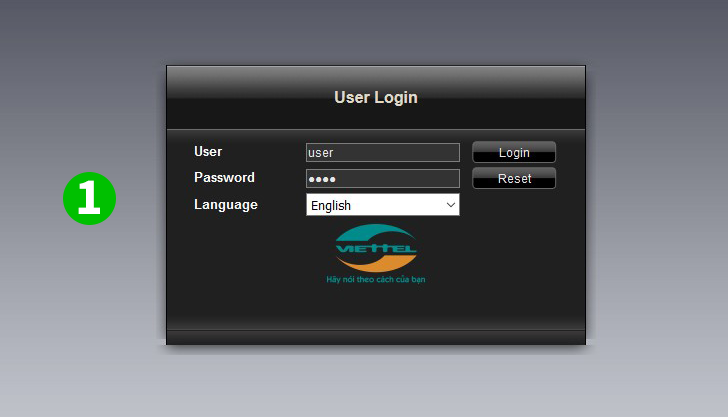
1 Log into your router with your username and password (default username: user, default password: user)
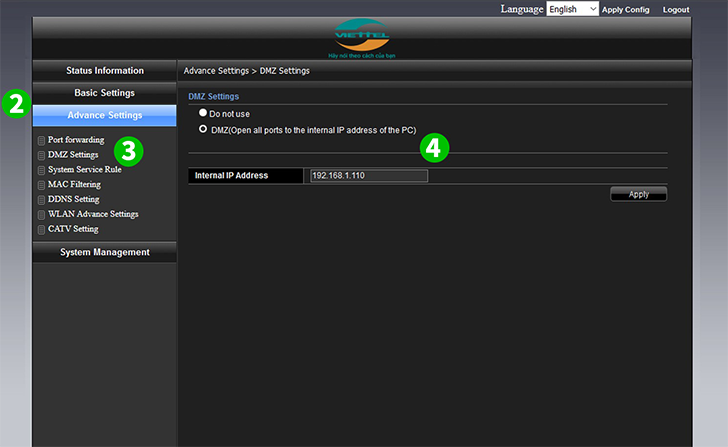
2 Click on "Advance Settings"
3 Click on "DMZ Settings"
4 Click on "DMZ (Open all ports to the internal IP of the PC)" and type your Internal IP Address, then click on "Apply"
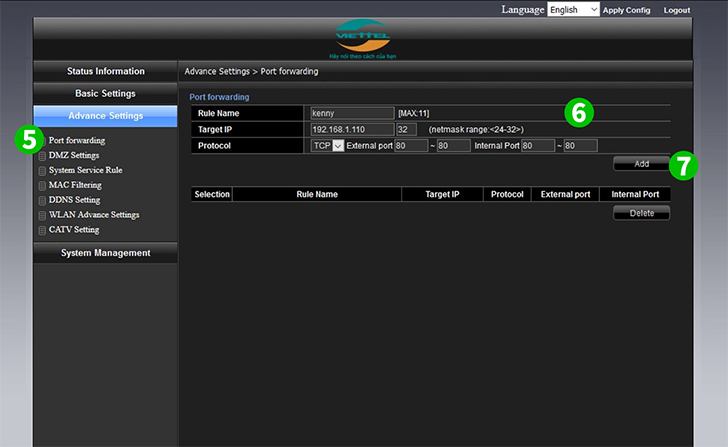
5 Click on "Port forwarding"
6 Fill out the entry fields:
Rule Name: you can put anything you want
Target IP: The IP address of the computer you are using
Netmask range: type 32
Protocol: TCP
External port: 80
Internal port: 80
7 Click on "Apply"
Port forwarding is now configured for your computer!