
Orange Livebox 3.0 port forwarding: step-by-step guide
This guide shows in 6 steps how to forward port 80 (HTTP) on the Orange Livebox 3.0 to your PC, so that a web server such as the free cFos Personal Net is reachable from the Internet. Other routers: all guides.
Enable port forwarding for the Orange Livebox 3.0

1 Open your Internet Browser and go to address 192.168.1.1
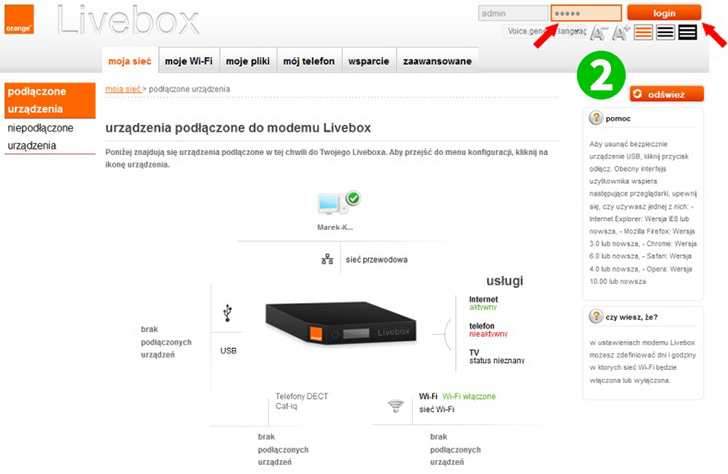
2 Enter your login data and press "Login". Default username is admin and password admin
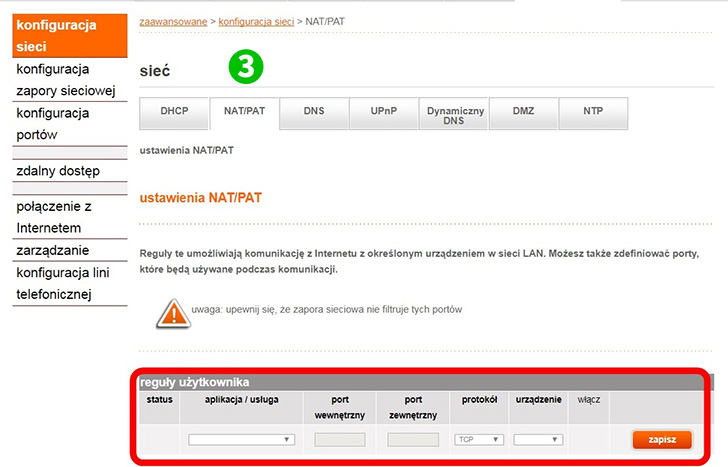
3 Go to "Zaawansowane" ("Advanced") and "konfiguracja sieci" ("Network configuration"). Press "NAT/PAT"

4 Select from "Aplikacja/Usluga" ("Application") HTTP Server and check that "Port zewnetrzny" ("External port") and "Port wewnetrzny" ("Internal port") are both 80. Now select the PC cFos Personal Net is running on from the "Urzadzenie" ("Device") list
5 Press "Zapisz" ("Save")

6 Check "Wlacz" ("Enable") button in your HTTP setup
Port forwarding is now configured for your computer!